

I was halfway through a web application pentest when I noticed something annoying. Every page load included a jQuery file served from the application's own backend. The server took 20 seconds to return it. Not a timeout. Not an error. Just 20 seconds of waiting, every single request, while the server assembled a response that was identical every time.
I needed a way to modify the response in Burp Suite - not a fragment, the entire thing. Paste the jQuery response once, set a URL pattern, and have every subsequent request return instantly with the cached copy. Burp's Match and Replace can swap fragments, but it cannot replace a full response. So I built Response Forger in an afternoon.
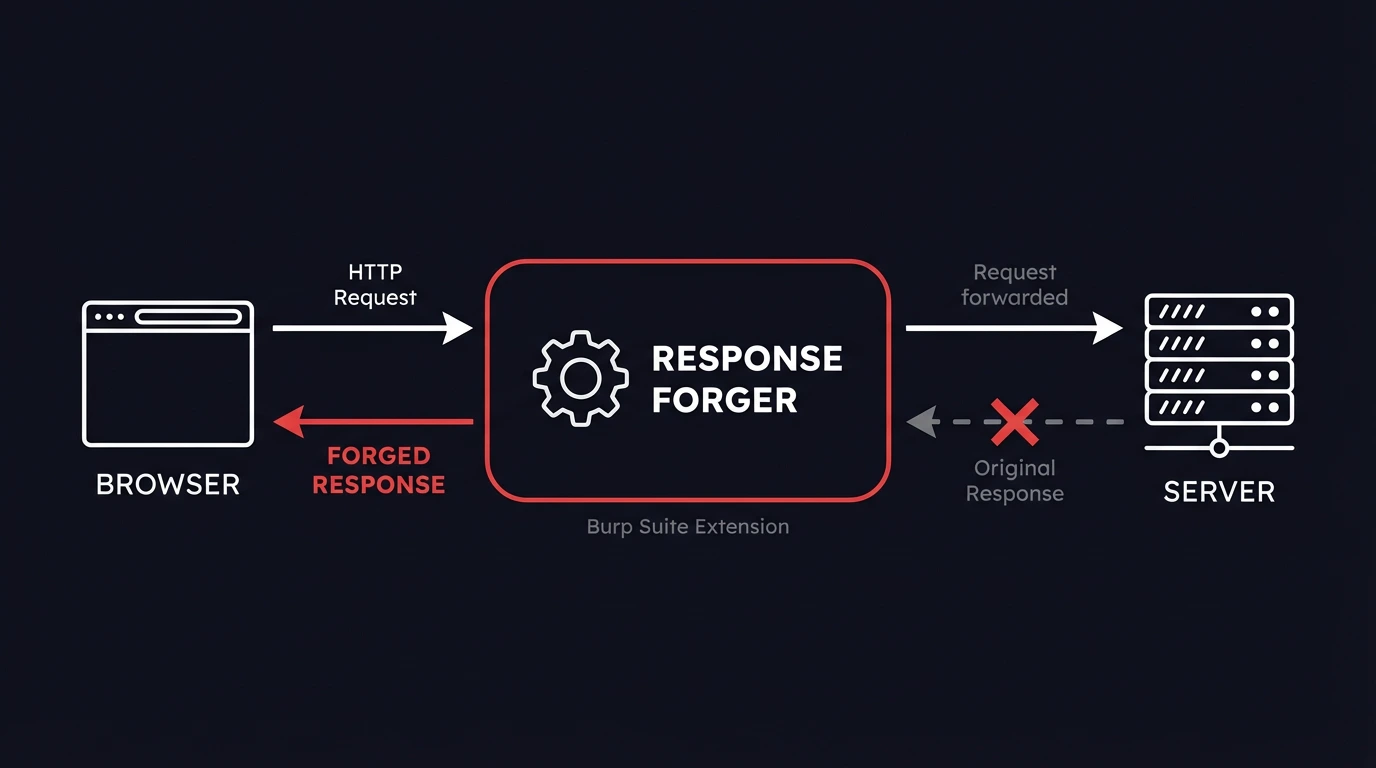
Response Forger is an open-source Burp Suite extension that lets you modify HTTP responses by replacing them entirely. Instead of searching for strings inside a response and swapping them out, you define a URL pattern and a complete replacement response - status line, headers, body, everything. When Burp intercepts a response matching your pattern, the server's actual response is discarded and yours is used instead. The 20-second jQuery wait became zero.
This is a different approach from Burp Suite Match and Replace. Match and Replace works at the fragment level: find X, replace with Y. Response Forger works at the response level: for this URL, use this response. That makes it faster for large payloads (no regex scanning) and more predictable - you know exactly what the browser receives. It is also simpler for the most common pentesting scenario: "I want this endpoint to return exactly this."
When You Need to Modify an Entire HTTP Response in Burp Suite
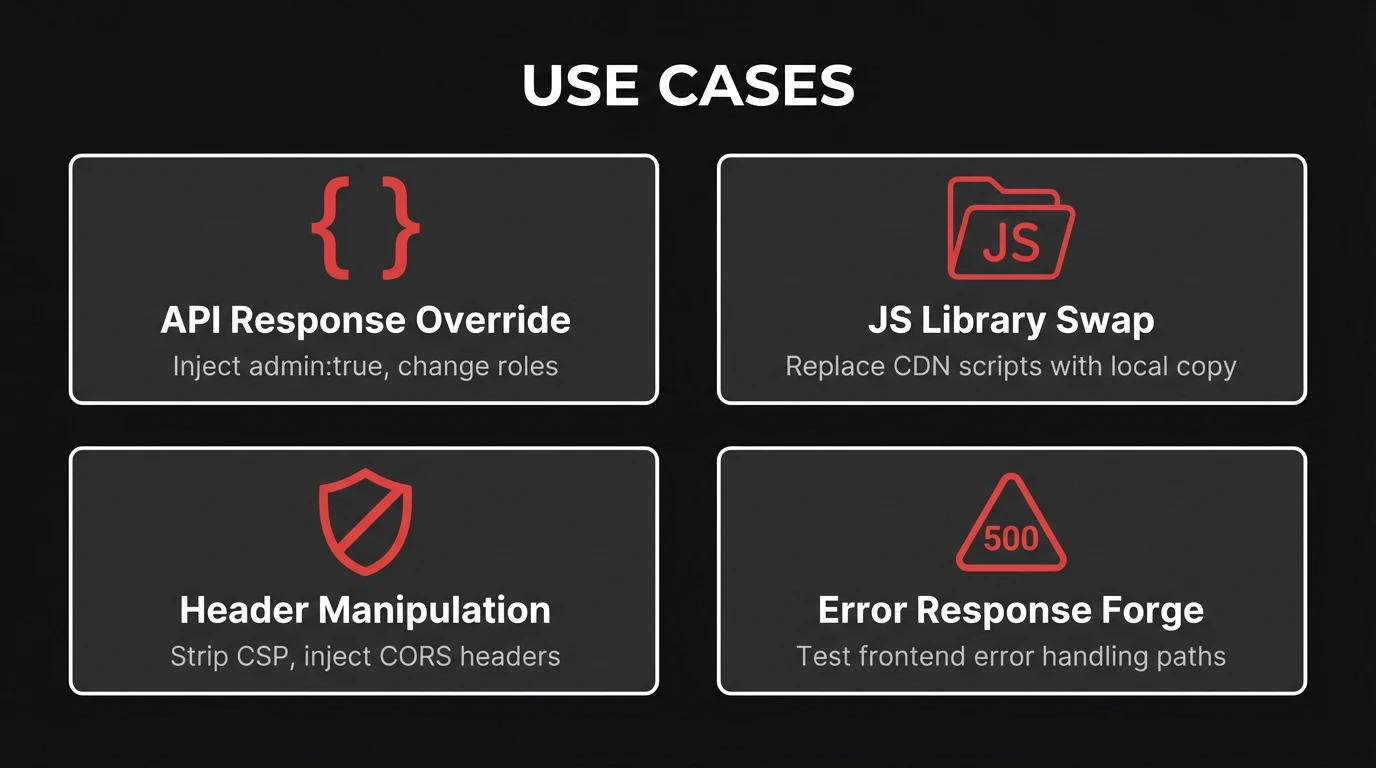
The jQuery story is one use case. Here are the others we hit regularly during engagements.
Manipulating frontend logic via API responses
Modern web apps check permissions client-side before showing admin panels, feature flags, or restricted UI elements. The server returns something like {"admin": false, "role": "viewer"}, and the frontend hides buttons accordingly.
Match and Replace can handle the simple case - swap false for true. But what if you need to change the role, add CORS headers so the browser accepts the cross-origin response, and set a specific status code? With Response Forger, you define the complete response once:
HTTP/1.1 200 OK
Content-Type: application/json
Access-Control-Allow-Origin: *
Content-Length: 42

{"admin": true, "role": "superadmin"}
Every request to that endpoint gets this response. No partial matching, no missed edge cases.
Replacing external JavaScript with modified copies
When an application loads JavaScript from a CDN or external source, you sometimes want to inject your own version - adding logging, disabling integrity checks, or modifying application logic. Match and Replace struggles here because the response body is tens of thousands of lines of minified JavaScript.
Response Forger's Script mode (covered below) makes this trivial. Point to a local file, and it is served automatically with the correct Content-Type header.
Removing or adding security headers
Burp Suite already has built-in options for stripping common security headers. In Proxy > Options > Response Modification, you can check boxes to remove Content-Security-Policy, X-Frame-Options, X-Content-Type-Options, and other headers from every proxied response. For individual header additions, Match and Replace handles it one rule at a time.
Response Forger fills the gap between these two. When you need a specific combination of headers on a specific endpoint - strip CSP, add a permissive CORS policy, set a custom X-Debug header, and change the status code, all in one rule - neither checkboxes nor Match and Replace get you there cleanly. Response Forger lets you define the exact header set for a URL pattern in a single rule, so you control exactly what the browser receives without juggling multiple Burp settings.
Forging error responses
How does the frontend handle a 500 Internal Server Error? A 403 Forbidden? A 404 with an unexpected body? Triggering real server errors during a pentest is messy - it may affect other testers, trip monitoring alerts, or require conditions you cannot easily reproduce.
With Response Forger, select a status code, paste the body you want, and every matching request gets that error response. Test error handling paths without touching the server.
How Response Forger Compares to Burp Suite Match and Replace
The distinction is worth stating clearly because it affects when you reach for each tool.
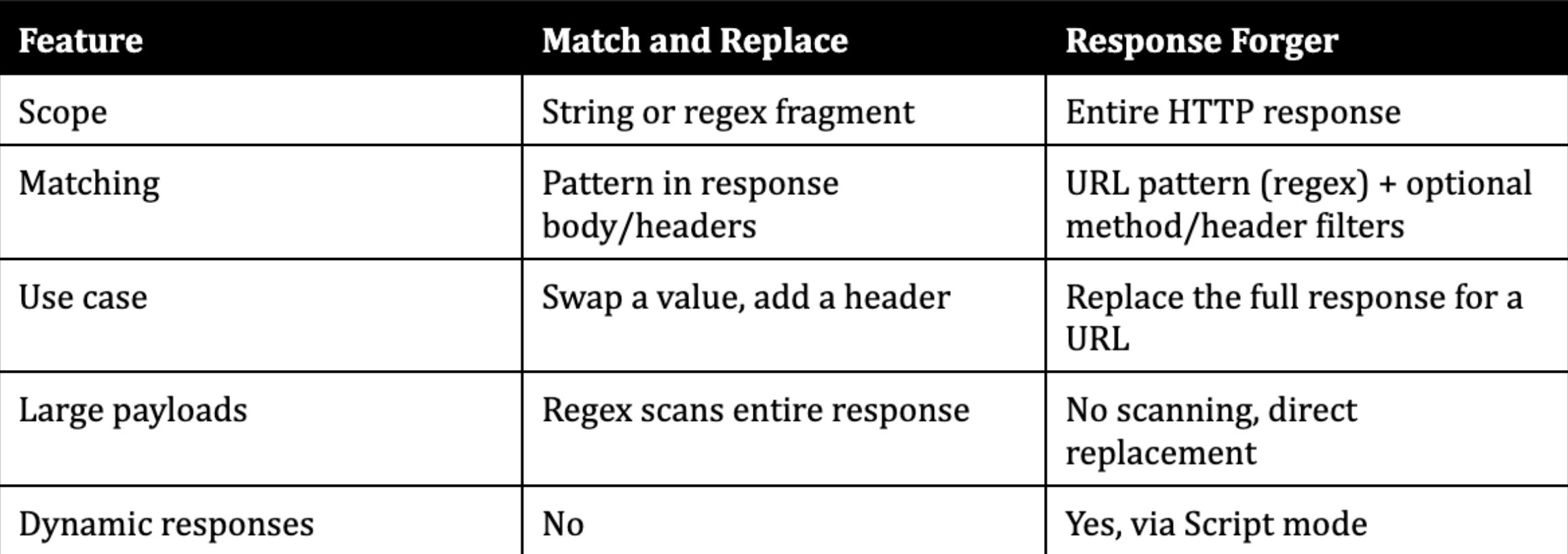
Match and Replace is the right tool when you need to change one value in an otherwise valid response. Response Forger is the right tool when you need full control over what the browser receives.
Script Mode - Dynamic Response Generation
%20-%20Forged%20Response..webp)
Static replacement covers most cases. But sometimes you need the forged response to change based on the incoming request. That is what Script mode does, and it is the primary new feature in v2.
In Script mode, instead of a static response body, you point Response Forger to a Python 3 script. When a matching request arrives, the extension runs the script, sends the full HTTP request as base64 on stdin, and uses whatever the script writes to stdout as the forged response.
The script runs as an external Python 3 process. The extension itself runs on Jython inside Burp's JVM, so Script mode bridges the gap to Python 3 and its full standard library.
Example: Injecting admin privileges
This script returns a JSON response with admin: true injected. If the original request has a JSON body, it uses that as the base and adds the admin fields:
#!/usr/bin/env python3
import sys, base64, json

raw = base64.b64decode(sys.stdin.read()).decode("utf-8", errors="replace")

data = {}
try:
    parts = raw.split("\r\n\r\n", 1)
    if len(parts) > 1 and parts[1].strip():
        parsed = json.loads(parts[1])
        if isinstance(parsed, dict):
            data = parsed
except ValueError:
    pass

data["admin"] = True
data["role"] = "superadmin"
body = json.dumps(data, indent=2)

sys.stdout.write(
    "HTTP/1.1 200 OK\r\n"
    "Content-Type: application/json\r\n"
    "Content-Length: %d\r\n"
    "Access-Control-Allow-Origin: *\r\n"
    "\r\n"
    "%s" % (len(body), body)
)
Example: Serving a local file
Replace a CDN-hosted JavaScript library with your own modified version. The script takes a file path as an argument and serves it with the correct MIME type:
#!/usr/bin/env python3
import sys, os, mimetypes

file_path = sys.argv[1]
sys.stdin.read()  # consume stdin per protocol

with open(file_path, "rb") as f:
    content = f.read()

content_type = mimetypes.guess_type(file_path)[0] or "application/octet-stream"
header = (
    "HTTP/1.1 200 OK\r\n"
    "Content-Type: %s\r\n"
    "Content-Length: %d\r\n"
    "\r\n"
) % (content_type, len(content))

sys.stdout.buffer.write(header.encode("utf-8") + content)
In the Response Forger script path field, enter: /path/to/serve_local_file.py /path/to/modified-app.js
Script mode API

Scripts have access to the full Python 3 ecosystem. Import requests, parse XML, query a database, generate responses based on request parameters - whatever the engagement requires.
Quality-of-Life Features That Matter During Engagements
A few things that save time when you are managing multiple rules across a long engagement.
Conditional matching. Each rule can filter by HTTP method and request headers, not just URL. Forge only POST responses to an endpoint while leaving GET untouched. Header matching uses regex, so you can target requests with specific cookies or authorization tokens.
Enable/disable rules. Toggle individual rules on and off without deleting them. When you have 10+ rules active and something behaves unexpectedly, disabling rules one at a time is faster than recreating them.
Right-click integration. Select a response in Burp's HTTP History, right-click "Send to Response Forger", and the URL pattern and response body are pre-filled as a new rule. No copy-pasting.
Hit counter. Each rule tracks how many times it has matched. Useful for confirming your regex is hitting the right requests, and for spotting stale rules that never fire.
Import/Export. Save and load rule sets as JSON files. Share configurations between engagements or hand them to a teammate working on the same target.
Auto Content-Length. The extension recalculates the Content-Length header to match the actual body size. One less thing to get wrong when editing a forged response.
Rules are evaluated in order, first match wins. This makes rule priority predictable when you have overlapping URL patterns.
How to Install and Use This Burp Suite Response Modification Extension
Response Forger is a single Python file that runs on Jython inside Burp Suite.
- Download Jython standalone JAR from jython.org if you have not already. Burp needs Jython to run Python extensions.
- Configure Jython in Burp Suite. Go to Extensions > Extension Settings > Python Environment, and set the path to your Jython JAR file.
- Download `response_forger.py` from the GitHub repository.
- Load the extension. Go to Extensions > Installed > Add. Set extension type to "Python", select response_forger.py, and click Next.
- Create your first rule. A new "Response Forger" tab appears in Burp. Click "Add New", enter a URL pattern (regex), paste your replacement response body, and click "Save".
Rules are persisted automatically in burp_response_forger_data.json next to the extension file.
Rule data model
Each rule is stored as a JSON object:
{
  "enabled": true,
  "url": "jquery\\.min\\.js",
  "method": "",
  "header_match": "",
  "mode": "static",
  "status_code": "200",
  "response": "<full response body here>",
  "script_path": "",
  "hits": 0
}
The url field is a regex pattern matched against the full request URL. The method field (optional) restricts matching to a specific HTTP method. The header_match field (optional) is a regex matched against the request headers.
Get Started
Response Forger is open source and free. The extension, example scripts, and documentation are on GitHub.
If you use it during an engagement and find something missing, open an issue. The tool exists because a pentester needed it during real work, and it will keep evolving the same way.
Frequently Asked Questions
How do I replace an entire HTTP response in Burp Suite?
Install Response Forger, create a rule with a URL pattern matching the target endpoint, paste your replacement response body, select the status code, and click Save. Every response matching that URL pattern will be replaced with your forged version. Unlike Burp Suite Match and Replace, which swaps text fragments, Response Forger overrides the complete response.
Can I use Burp Suite Match and Replace to modify an entire response?
Match and Replace operates on fragments - it finds a string or regex pattern inside a response and replaces it with another string. It can add individual headers, but it cannot replace the entire response body or change the status code. For full response replacement, you need an extension like Response Forger.
Does Response Forger work with Burp Suite Community Edition?
Yes. Response Forger uses the Burp Extender API (IHttpListener), which is available in both Community and Professional editions. The extension is a single Python file with no external dependencies beyond Jython.
How does Script mode work in Response Forger?
Script mode runs an external Python 3 script for each matching request. The extension sends the full HTTP request as base64 on stdin. Your script writes a complete HTTP response (status line, headers, body) to stdout. Scripts have a 10-second timeout. If the script fails or produces no output, the original server response passes through unchanged.
What is the difference between Response Forger and ResponseTinker?
ResponseTinker from TrustedSec uses jRuby snippets for fine-grained response modification, requiring a jRuby environment in Burp. Response Forger focuses on complete response replacement with a simpler UI - define a URL pattern, define the response. Response Forger runs on Jython (Python), requires no scripting for static rules, and adds dynamic response generation via Python 3 Script mode.