

Rapid7 was a well-known name in security when I was first learning the trade. That's exactly why I didn't expect to find anything when I was asked to audit AppSpider Pro 7.4.56 - their dynamic web application scanner. I assumed established security vendors don't ship vulnerable software.
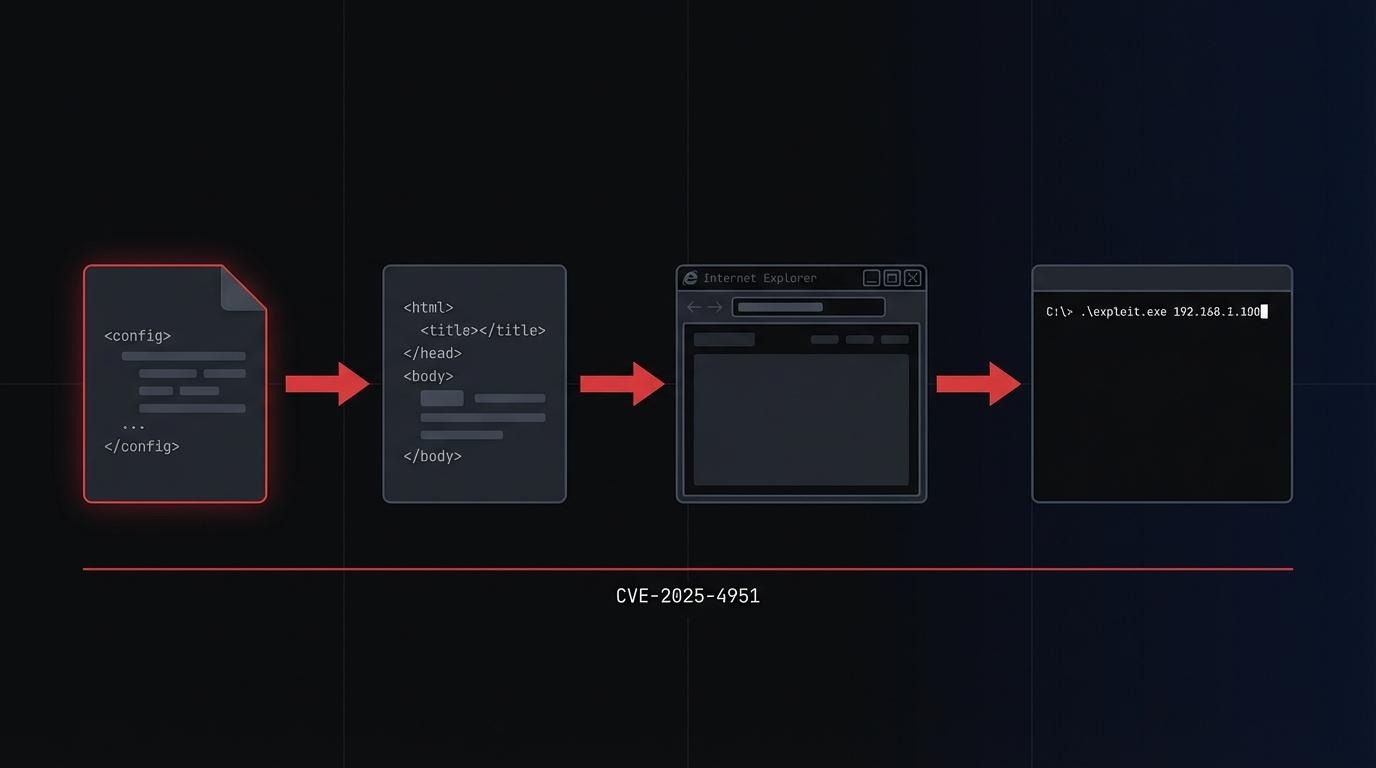
The result was a stored XSS RCE chain: JavaScript injected into a config file, rendered in Internet Explorer, escalating to arbitrary command execution via ActiveX. Four vulnerabilities. One attack path. No external tools required to find any of them.
The engagement had one hard constraint: no internet access, no external tools. Everything had to be done manually.
What is stored XSS RCE? Stored XSS RCE is a vulnerability chain where JavaScript is saved into a persistent data store - a file, database record, or configuration - and executes when another user views that data. When the execution environment supports capabilities like ActiveX, the JavaScript payload can reach beyond the browser and run arbitrary system commands. The "stored" part means the attacker doesn't need to be present when the victim triggers the payload.
What AppSpider Is and Why It's Worth Attacking
AppSpider Pro is a vulnerability scanner. It scans web applications and generates HTML reports of what it found. In enterprise deployments, it runs on a shared Windows host - multiple users, multiple projects, multiple scan reports sitting in the same directory structure under C:\AppSpider\Scans\.
That shared structure is the attack surface. Every user can see every other user's projects. If you can inject malicious content into a report that another user opens, and AppSpider opens those reports in Internet Explorer with ActiveX controls enabled, you have a path from a local user account to arbitrary code execution.
The question was whether that path was accessible.
Vulnerabilities Found

The Stored XSS RCE Chain
Each step below follows from the previous one. The chain is what gives it impact - any individual bug here is limited on its own.
Step 1: The UI Lies to You
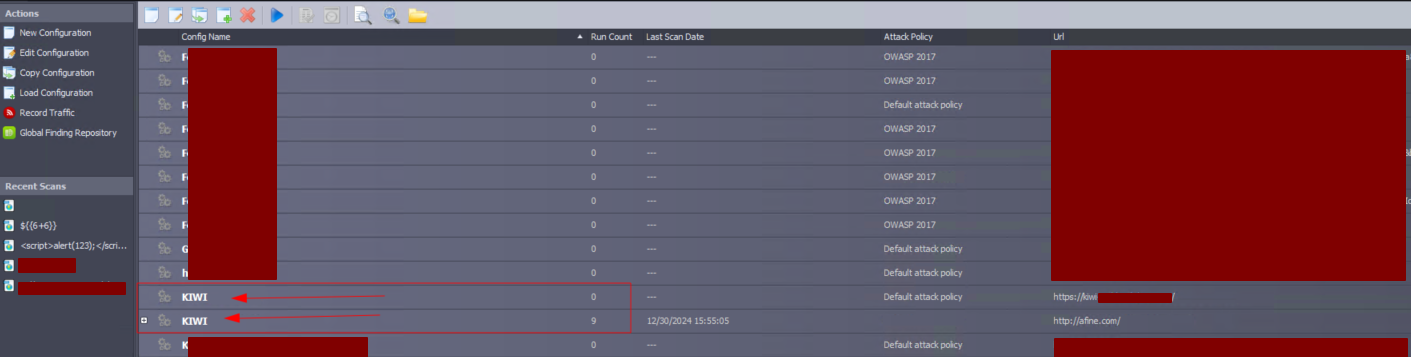
AppSpider prevents you from creating two projects with the same name. The error message is clear, the validation works. If another user has a project called KIWI, you can't create one named KIWI.
That's only true in the UI.

Every scan configuration lives in a plain XML file: C:\AppSpider\[scan_name]\[scan_name].scfg. Open it in Notepad and you can change the <Name> field to anything - including a name that already exists.
<?xml version="1.0"?>
<ScanConfig>
  <Name>KIWI</Name>
  <AppVersion>7.0</AppVersion>
  ...
Now the project list shows two entries both named KIWI. When a user looks for their scan, they might open yours. On its own this is low severity (CVSS 3.3) - but it increases the probability that the victim clicks into your project instead of their own. It's the setup for what comes next.
Step 2: Stored XSS via Config File
The same config file accepts unsanitized input in the <Name> and <UserAgent> fields. Both render into the generated HTML report without sanitization.
Inject a JavaScript payload into <Name>:
<Name><![CDATA[<script>alert(123);</script>]]></Name>When a scan runs with this config, the generated report embeds the script. The report is an HTML file. AppSpider opens it in Internet Explorer.
This is where stored XSS becomes RCE.
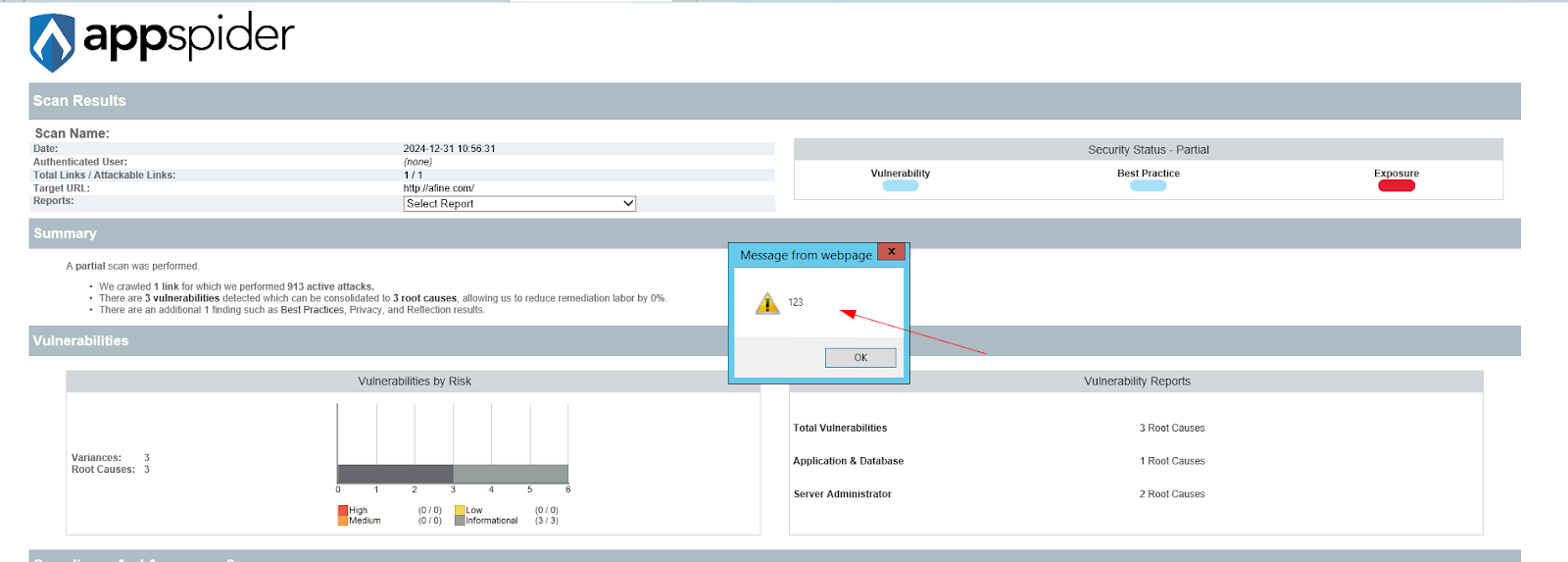
Step 3: Internet Explorer + ActiveX = Stored XSS to RCE
Internet Explorer 11 remains installed on Windows 10 LTSC and Windows Server 2016/2019/2022 systems - the environments where AppSpider is most commonly deployed. It supports ActiveX controls. And ActiveX can call WScript.Shell, which runs arbitrary system commands.
The payload that makes this a stored XSS RCE chain:
<Name><img src="x" onerror="try { var ws = new ActiveXObject('WScript.Shell'); ws.Run('calc.exe'); } catch (e) { console.log(e); }"></Name>
When the victim opens the infected report in AppSpider, IE renders the HTML, the onerror handler fires, WScript.Shell.Run() executes. The calc.exe is proof-of-concept - replace it with any command.
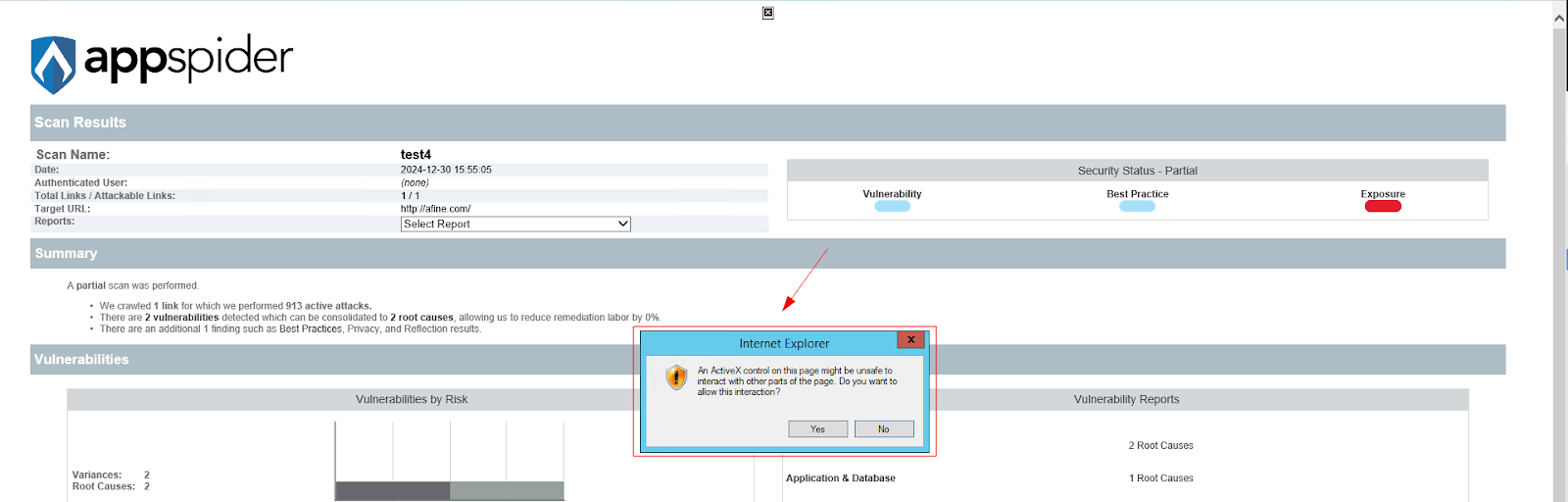
The same payload works in <UserAgent>. That field is more useful operationally: the project name looks clean, there's nothing suspicious visible in the UI. The code fires only when the user opens the Status and Configuration tab in their report.
This is CVE-2025-4951.
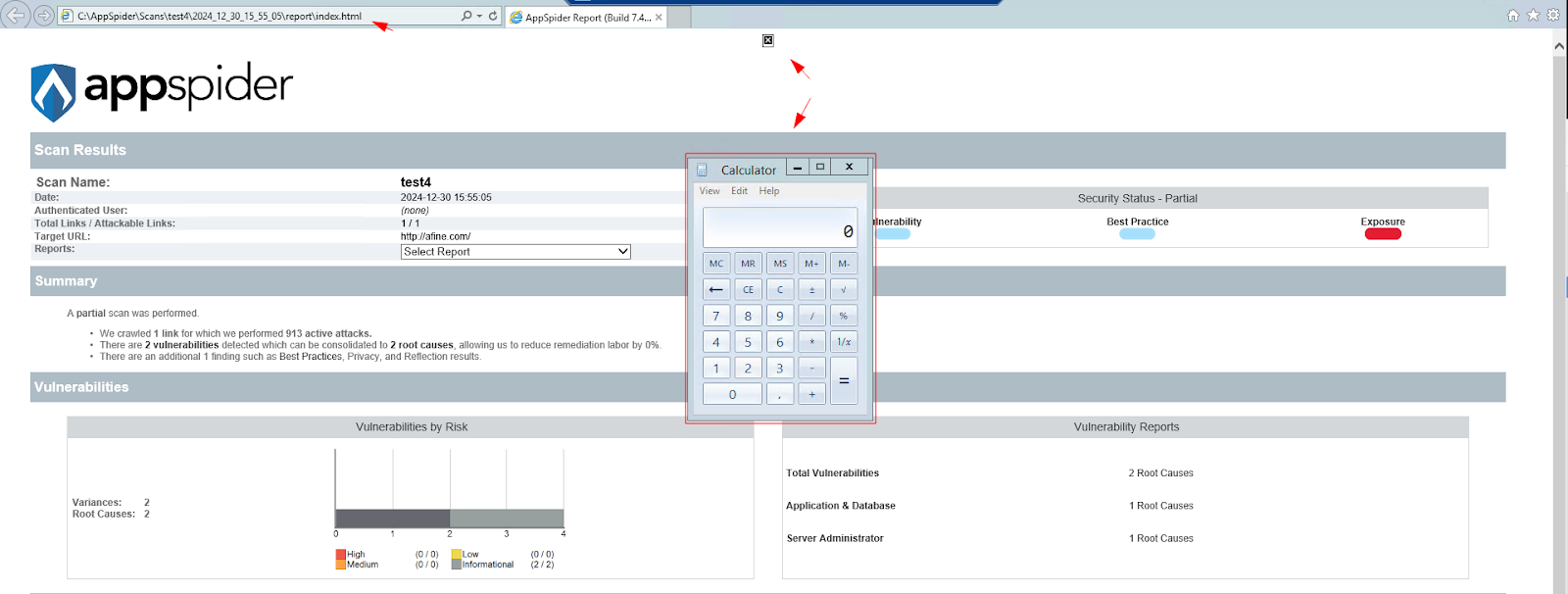
Step 4: Broken Access Control - The Shortcut That Makes It Worse
The duplicate-name trick from Step 1 is probabilistic - the victim has to click the wrong KIWI. There's a more direct path.
Windows file permissions on AppSpider scan directories are misconfigured. Standard users cannot edit or delete other users' config files - but they have "Create files / write data" and "Create folders / append data" permissions on directories they don't own.
This distinction matters more than it looks. You can't modify an existing file. But you can create a new file and copy it into another user's directory.
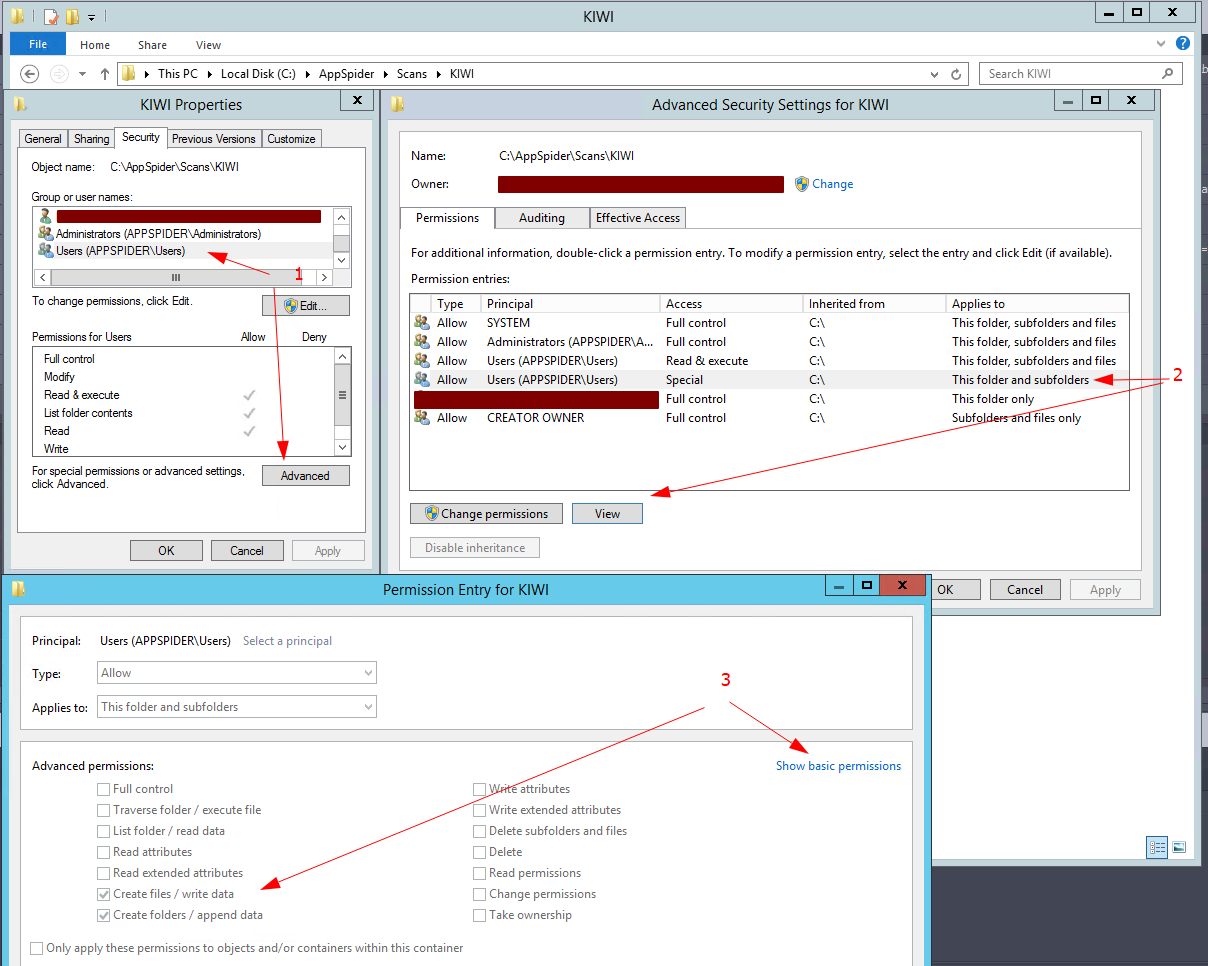
AppSpider loads configuration files alphabetically. Name your malicious config aaa.scfg and drop it into a victim's scan folder. When the victim runs their project, the application picks up aaa.scfg first - your config, your payload, their execution context.
The victim doesn't open anything unusual. They open their own project, their scan runs, the report generates with your payload inside it. They open the report. ActiveX fires.

The full stored XSS RCE attack chain:
- Create an aaa.scfg file with an ActiveX payload in <Name> or <UserAgent>
- Copy it into a victim's scan directory (Windows ACL misconfiguration permits this)
- Victim runs their own project - AppSpider loads aaa.scfg first (alphabetical order)
- Report generates with the payload embedded in the HTML
- Victim opens report in AppSpider - Internet Explorer renders it
- ActiveX executes arbitrary system commands in the victim's user context
No social engineering beyond normal usage. The victim just uses their scanner.
Stored XSS RCE in an Air-Gapped Environment
These findings were made with no internet access and no external tools. No Burp Suite, no browser-based scanners, no automated fuzzers. The vulnerability wasn't found by pointing a scanner at AppSpider - it was found by reading config files in a text editor, checking Windows file permissions, and understanding how the application handles its own data.
Automated scanners don't look at XML fields and ask whether that data ends up unescaped in an HTML report rendered by Internet Explorer. They don't enumerate Windows ACLs with alphabetical file loading in mind. Manual testing found this.
That matters in the environments where AppSpider is deployed: financial institutions, healthcare, critical infrastructure - sectors where network isolation is a security control, not a convenience. The attack surface in those environments is local. The testing methodology has to match.
CVE Details
CVE-2025-4951
- Product: Rapid7 AppSpider Pro 7.4.56
- Type: Stored XSS leading to RCE via ActiveX controls
- CVSS Vector (researcher assessment, full chain): CVSS:3.1/AV:L/AC:L/PR:L/UI:R/S:C/C:H/I:H/A:L / Score: 8.1
- CVSS Score (NVD, isolated XSS): 4.6 Medium (CVSS:3.1/AV:L/AC:L/PR:L/UI:R/S:C/C:L/I:L/A:N)
- CWE: CWE-79 (Improper Neutralization of Input During Web Page Generation)
- Researcher: Maksymilian Kubiak, AFINE
- Status: Reported to Rapid7, CVE assigned
Recommendations
- Replace Internet Explorer with a modern browser for report rendering. Edge, Chrome, and Firefox do not support ActiveX. This removes the stored XSS RCE escalation path entirely.
- Sanitize config file fields on read, not only on write through the UI. Input validation that applies only to the interface is not input validation - it's UI validation. The underlying data store must be treated as untrusted.
- Fix directory permissions on scan folders. Standard users should not have write access to directories owned by other users. Group Policy can enforce this at the organization level.
- Verify report integrity before rendering. A checksum or signature check on report files would prevent direct injection into index.html.
- Load configs by identifier, not alphabetically. File naming should not be a valid attack vector for config precedence.
On Auditing the Auditors
AppSpider is a vulnerability scanner. The finding is a stored XSS RCE chain inside the vulnerability scanner.
The irony reflects a real gap. Security tooling gets less scrutiny than the applications it audits. The assumption is that security vendors know better - and they often do. Sometimes, though, there's an unvalidated XML field that ends up in an IE-rendered HTML report, and nobody thought to check it because it was their own tool.
Methodology finds things that assumptions miss. An air-gapped environment with no automated tools is exactly the constraint that forces you to look at how an application actually works - not just what a scanner reports about it.
That's the argument for manual testing. Not that it's more thorough in every case. But that some findings are only visible when you stop running tools and start reading files.
If your organization runs AppSpider or similar vulnerability management tooling in shared or regulated environments and wants to know whether the tooling itself is secure, contact AFINE to discuss a security review.
FAQ
What is stored XSS RCE?
Stored XSS RCE is a two-stage attack chain. In the first stage, an attacker injects malicious JavaScript into a file or database that the application later renders as HTML - this is the "stored XSS" part. In the second stage, the JavaScript payload exploits the rendering environment to execute system-level commands - this is the "RCE" part. In AppSpider, the rendering environment is Internet Explorer with ActiveX enabled, which provides the WScript.Shell object needed for command execution.
Does this affect current versions of AppSpider?
The findings were reported in AppSpider Pro 7.4.56. Check the Rapid7 security advisory for information on patched versions.
Is Internet Explorer still a real attack vector in 2025?
IE 11 was retired on mainstream Windows 10 in June 2022 and was never included in Windows 11. But it remains present on Windows 10 LTSC and Windows Server 2016/2019/2022 - which is where AppSpider runs in enterprise environments. AppSpider defaults to IE for report rendering on those systems, which is what creates the ActiveX execution path.
Why would a security scanner be vulnerable to this?
Security tools are software. They're built under the same time and resource constraints as any other enterprise application. Vendors rarely apply to their own tools the same methodology they'd apply on a client engagement. In this case, AppSpider trusted its own config files - the assumption was that locally stored XML wouldn't contain malicious input. That assumption created the exposure.
Can this be exploited without physical access?
The attack vector is local (AV:L in the CVSS vector). An attacker needs a valid user account on the host running AppSpider. In a shared enterprise deployment, that means any licensed user of the application - including lower-privileged accounts that have no business reason to access other users' scan data.