

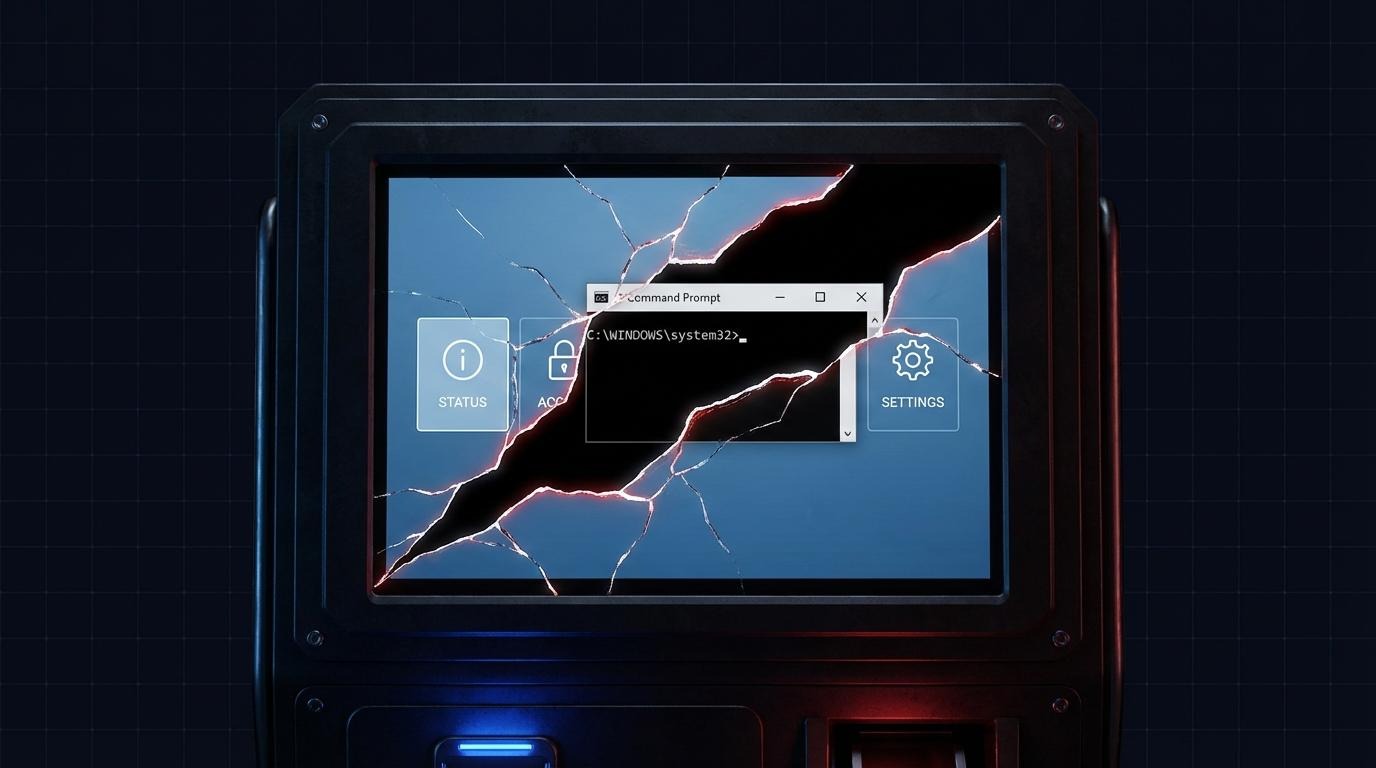
In Part 1 of this series, I cracked the KioWare access PIN with a $3 Attiny85 microcontroller. The brute force worked. But KioWare's auto-logout kicked in before I could do anything useful with the access. The PIN broke, and then the window closed.
This post covers what comes next: three distinct kiosk breakout techniques that took me from a useless PIN bypass to full NT AUTHORITY\SYSTEM privileges on the underlying Windows host.
What is a kiosk breakout?
A kiosk breakout is any method used to escape a locked-down kiosk environment and access the underlying operating system. A successful kiosk breakout typically requires bypassing multiple security layers - authentication, application sandboxing, and privilege restrictions. Each layer is designed to stop you independently. The methodology is about finding the weakest link in the chain.
I discovered the three vulnerabilities covered here during an AFINE engagement and disclosed them through CERT Polska. One is a bypass of a vulnerability originally found by security researcher olnor18. All affect KioWare for Windows, a kiosk lockdown software product used by thousands of organizations in retail, healthcare, banking, and government.
What a pentester faces: kiosk lockdown layers
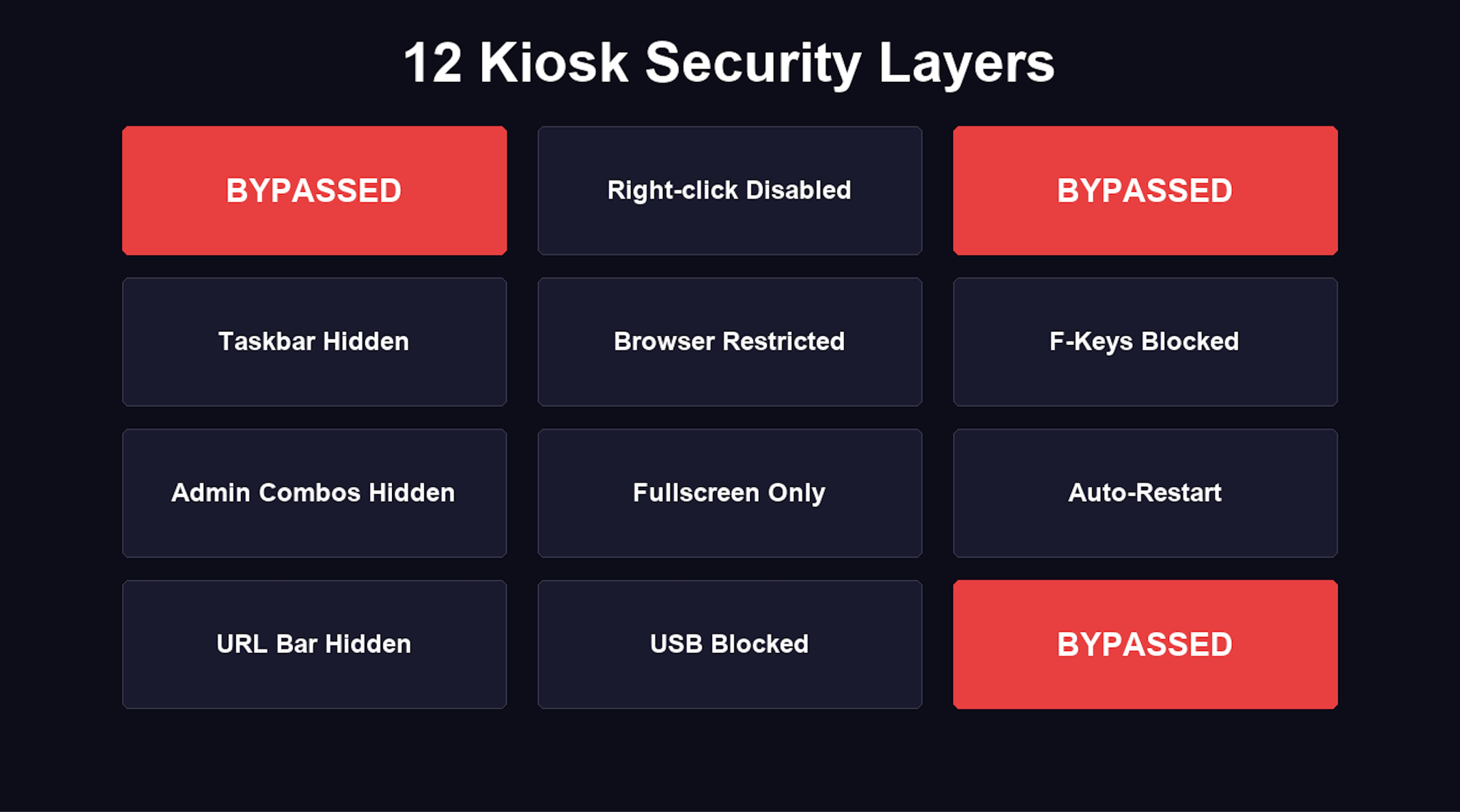
Before walking through each escape, here is what a typical locked-down kiosk puts between you and the operating system:
- OS-level kiosk mode - the application runs in an isolated environment
- Right-click disabled
- Keyboard shortcuts blocked (Ctrl+Alt+Del, Alt+Tab, Win+R)
- Taskbar and Start menu hidden
- System browser access disabled
- Function keys (F1-F12) blocked
- Hidden admin key combinations
- No close button - fullscreen only
- Auto-restart on crash
- URL bar hidden
- USB ports blocked or disabled
- File download restrictions
Each control is a layer. Most kiosk breakout methods work not because any single control fails, but because the interactions between controls create gaps. A file download restriction that works perfectly inside the kiosk browser means nothing if a third-party PDF viewer can reach the filesystem.
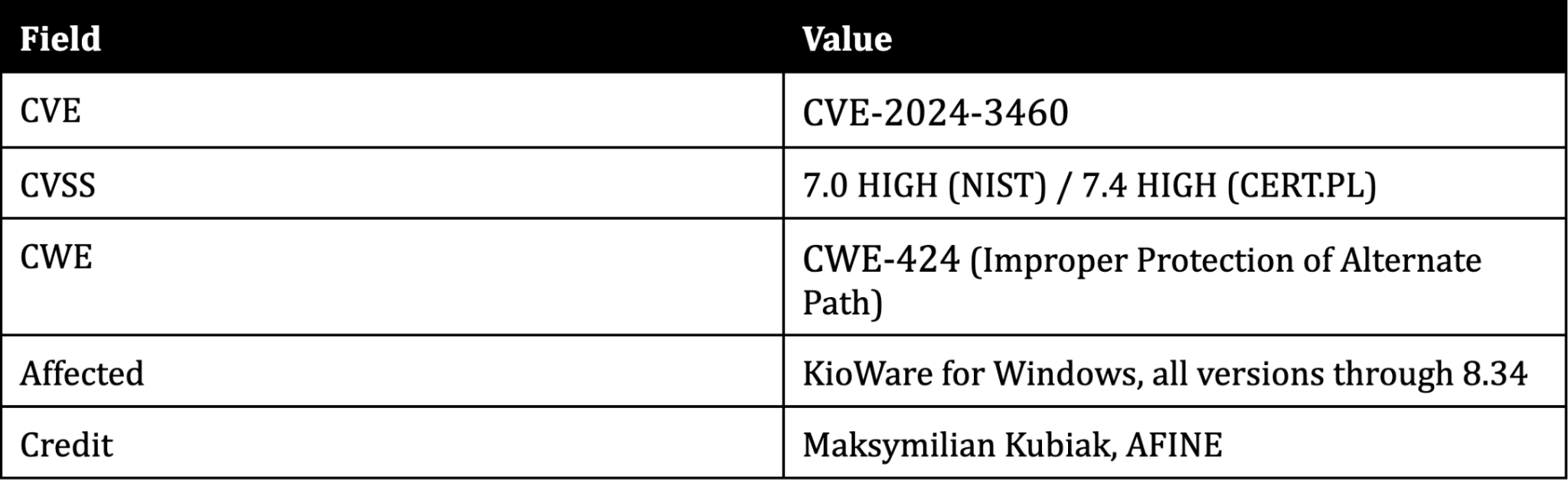
Technique 1: Creating a time window (CVE-2024-3460)
The problem
After entering the correct PIN and closing KioWare, the application auto-logs out the current user. This is the defense that stopped me in Part 1. The PIN was cracked, but logout happened before I could interact with anything outside the kiosk environment. Without a way to extend this window, the PIN brute force from Part 1 was a dead end - technically successful, practically useless.
The technique
KioWare's "close all applications on startup" function is not fully functional. It prompts the user to close running applications but does not force-kill all of them. If applications like Notepad, Word, or a browser were running when KioWare launched, they remain open in the background.
The key insight: spamming Ctrl+P (the print dialog shortcut) before exiting KioWare slows the application down significantly. Each print dialog trigger adds processing overhead. After enough triggers, closing KioWare creates a time window - seconds where the auto-logout has not yet completed but the kiosk lockdown is no longer enforcing restrictions. This is what turned the PIN brute force from Part 1 into a real attack - the PIN gets you in, and the time window keeps you there long enough to act.
The restricted environment breakout
During this window:
- Press Alt+Tab to switch to an application running in the background (e.g., Notepad.exe)
- In Notepad: File > Open
- The Open dialog is a standard Windows file browser
- Navigate to any location on the filesystem
- Change file type filter from "Text Documents" to "All Files"
- Right-click any executable > Open
- cmd.exe runs outside the kiosk sandbox
This is a classic file dialog escape - a technique that appears across kiosk breakout attack writeups because the Windows file dialog is effectively a full filesystem browser. Every application that can open a File > Open or File > Save dialog becomes a potential escape vector.
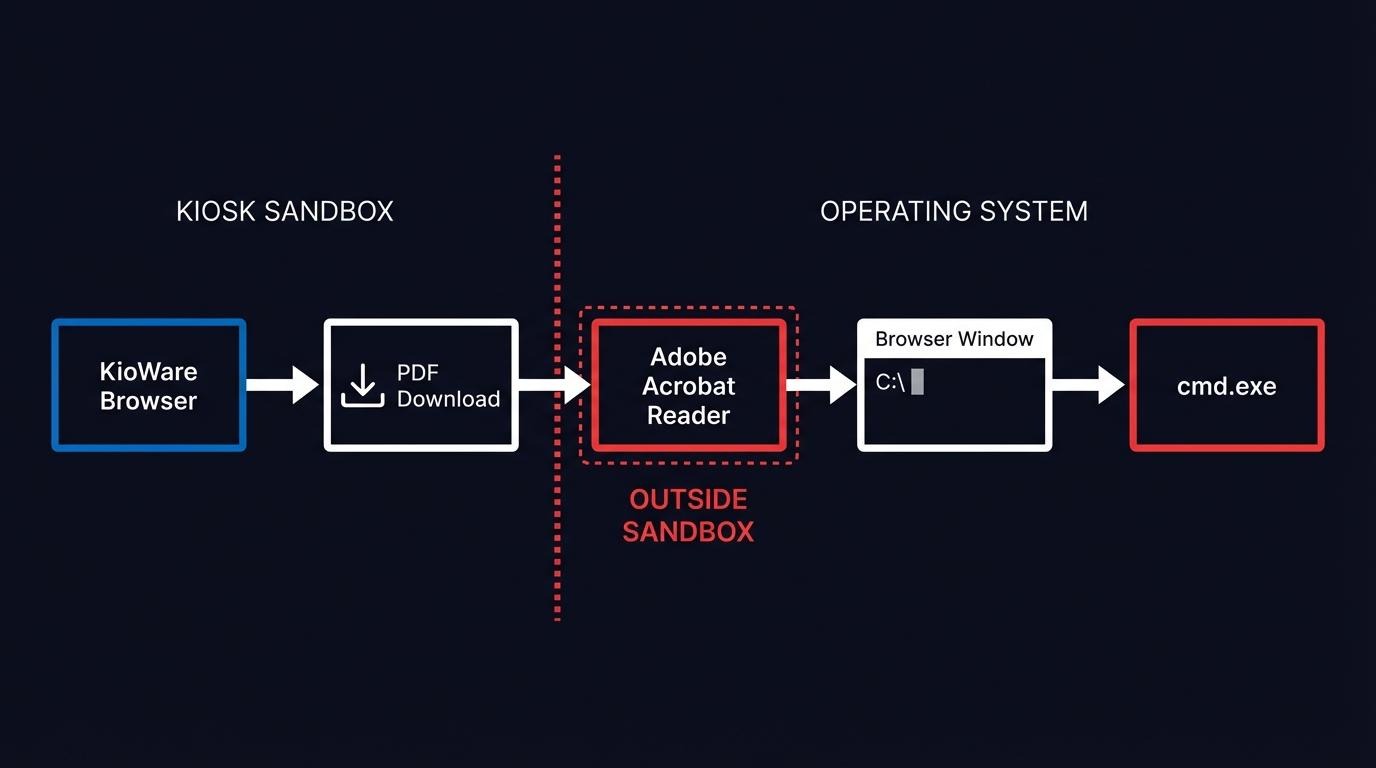
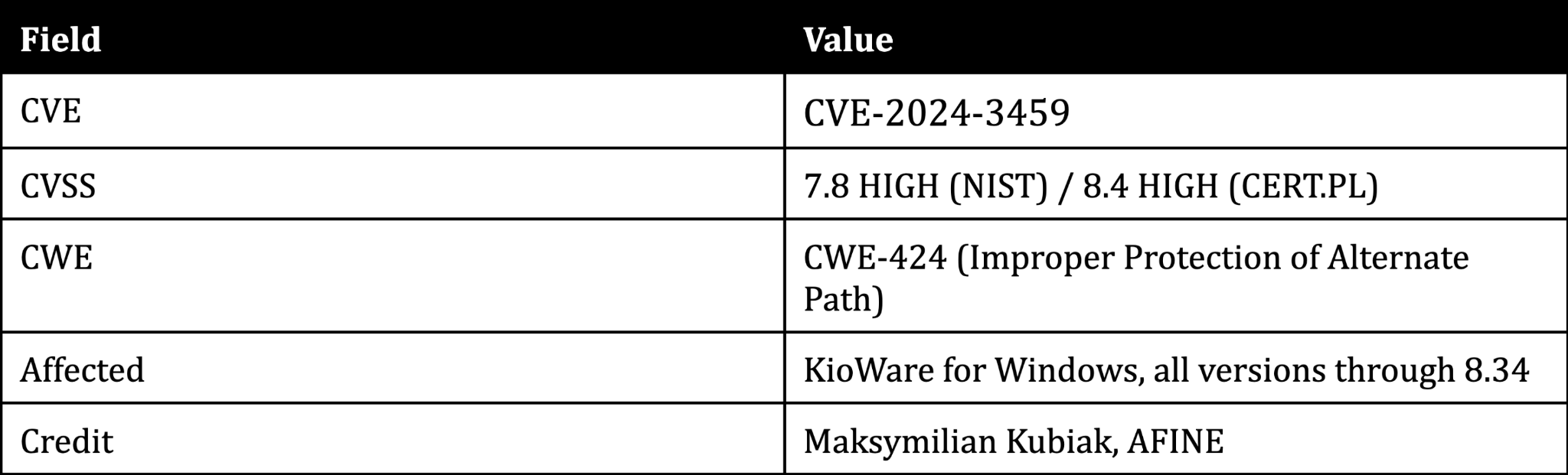
Technique 2: Escaping the sandbox via Adobe Acrobat Reader (CVE-2024-3459)
The problem
KioWare sandboxes its own browser. Links, downloads, and navigation are restricted to the kiosk application's controlled environment. The sandbox works correctly for content rendered inside KioWare's browser.
The insight
The sandbox cannot control what happens when Windows hands off a file to an external application via file type association. This is the fundamental kioware vulnerability: the kiosk controls its own browser, but not the operating system's default file handlers.
Step-by-step kiosk sandbox escape
- The user clicks a link to a PDF file within the KioWare browser
- KioWare opens the PDF as another tab in its interface
- The user clicks the download icon in the PDF viewer
- The file is saved to disk
- Windows default file association opens the PDF in Adobe Acrobat Reader - outside the KioWare sandbox
- Most Acrobat features that allow system interaction are blocked
- But: clicking the "More information" button opens a browser window
- In the browser address bar, enter a local path (e.g., C:\) to browse the filesystem
- Attempting to run programs from the address bar just downloads them
- But: open the Downloads folder from the browser, navigate to any location on disk
- Right-click any executable > Open - the program runs
Adobe Acrobat Reader becomes the escape hatch. The kiosk application breakout works because KioWare treats its own browser as the security boundary. Once a file crosses that boundary through a download and a file type association, the kiosk has no further control over execution.
This is why kiosk security testing methodology should always test file type associations. The kiosk browser may be locked down, but the question is: what happens when content leaves the browser?
Technique 3: From user to NT AUTHORITY\SYSTEM (CVE-2022-44875 bypass)
Context: the original vulnerability
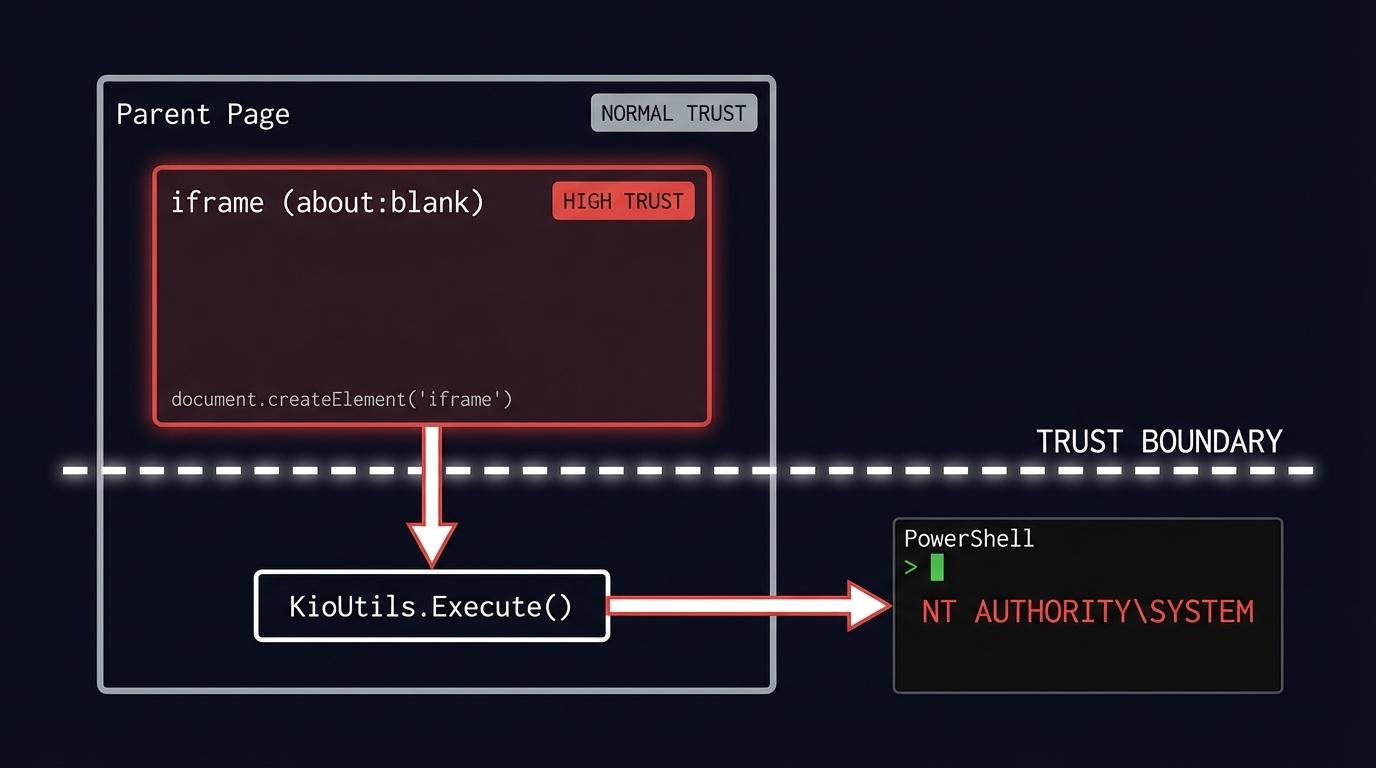
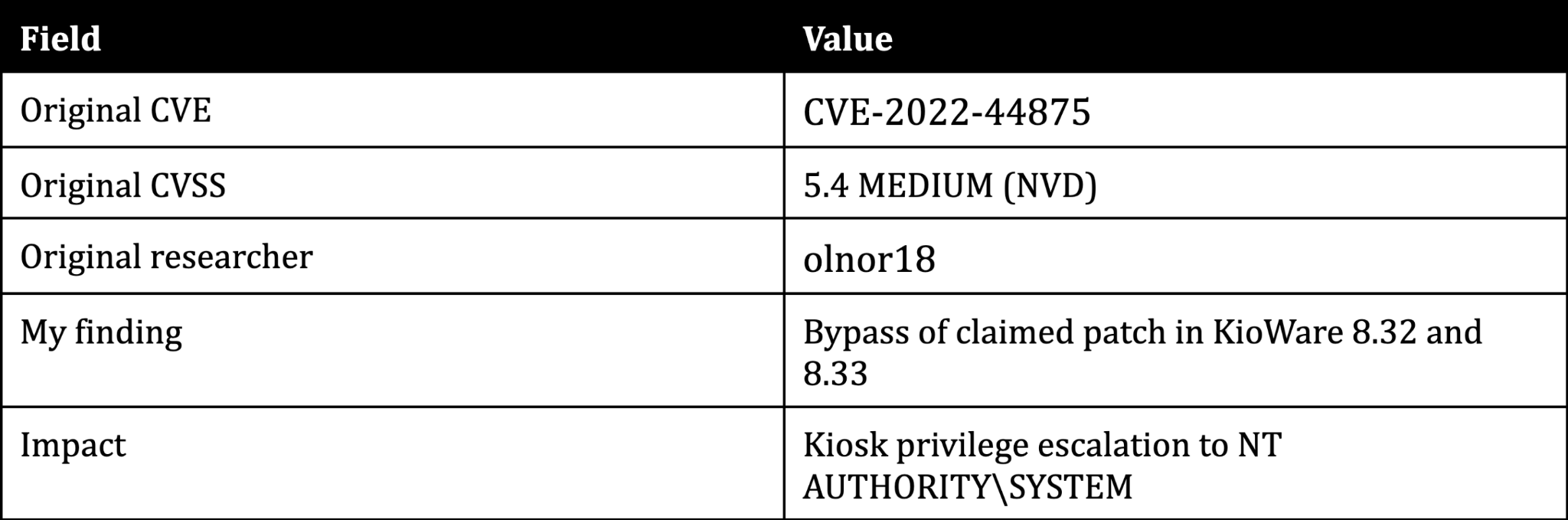
In 2022, security researcher olnor18 discovered that KioWare's KioUtils.Execute function runs processes with NT AUTHORITY\SYSTEM privileges. Access to this function is controlled by checking the trust level of the calling context via KioScriptingUrlACL.AclActions.AllowHigh.
The problem: the `about:blank` origin is treated as trusted. And iframes without a src attribute have the origin about:blank.
This means any page that can create an iframe and execute JavaScript in its context can call KioUtils.Execute and spawn processes as SYSTEM - the highest privilege level on Windows.
The vendor said it was fixed
KioWare publicly stated that versions 8.32 and 8.33 patched CVE-2022-44875. During my assessment, I tested those versions. They were not patched.
The bypass payload
The entire kiosk privilege escalation fits in a single line:
<script>let c=document.createElement("iframe");document.body.appendChild(c);c.contentWindow.eval("KioUtils.Execute('powershell',true)")</script>This creates an iframe (origin: about:blank), executes KioUtils.Execute in its context, and spawns PowerShell as NT AUTHORITY\SYSTEM. The trust boundary between the parent page and the iframe is the entire vulnerability - and KioWare's patch did not close it.
The OWASP domain trick
To exploit this, the attacker needs to load a page containing the iframe payload inside KioWare's browser. KioWare itself does not have URL reputation filtering - but the banking environment where I tested this did. The client's network security stack filtered requests by domain reputation score.
My own VPS failed the filter. Low reputation domain, blocked immediately.
The solution: OWASP Juice Shop - an intentionally vulnerable web application hosted by OWASP for security training. Juice Shop is full of deliberately exploitable flaws, including cross-site scripting. The OWASP domain had high reputation in the client's filter, so I used an XSS vulnerability in Juice Shop to trigger the iframe payload from a trusted origin.
The irony is hard to miss. An intentionally vulnerable application built by the organization that maintains the world's most widely referenced catalog of web security flaws - used as the trusted delivery mechanism for a real exploit.
Kiosk breakout: the full attack chains

The three techniques do not form a single linear path. They combine into three distinct attack chains, each reaching the operating system through a different route.
Chain 1: Time window to cmd.exe
- Brute-force the KioWare access PIN (CVE-2024-3461)
- Create a time window by spamming Ctrl+P before exiting (CVE-2024-3460)
- Alt+Tab to a background application that KioWare failed to close (e.g., Notepad, Word)
- File > Open dialog > navigate to cmd.exe > execute
This chain exploits KioWare's broken application shutdown mechanism. If any application was running when the kiosk launched, it remains accessible during the time window.
Chain 2: PDF download to cmd.exe
- Click a PDF link inside the KioWare browser
- PDF opens in KioWare's built-in reader
- Download the file from the built-in reader
- Windows auto-opens the downloaded PDF in Adobe Acrobat Reader - outside the sandbox (CVE-2024-3459)
- Click "More Information" in Acrobat > a browser window opens
- Use the browser address bar to navigate the filesystem > cmd.exe
This chain requires no PIN bypass. Any user-facing kiosk that serves PDF content is potentially exposed.
Chain 3: XSS payload to SYSTEM
- Use kiosk functionality (chat widgets, hyperlinks, embedded content) to navigate to pages outside the kiosk's intended scope
- Bypass the URL reputation filter in the client's environment by leveraging an intentionally vulnerable OWASP application (Juice Shop) hosted on a high-reputation domain
- Trigger the CVE-2022-44875 iframe payload through a cross-site scripting vulnerability
- KioUtils.Execute spawns cmd.exe as NT AUTHORITY\SYSTEM
This chain reaches the highest privilege level. The reputation filter bypass is specific to the banking environment I tested in - KioWare itself does not have reputation filtering, but many production kiosk deployments add network-level URL controls.
Four vulnerabilities across three chains. Three discovered during AFINE research, one a bypass of a known vulnerability the vendor claimed was patched. Different entry points, different paths - same destination: full control of the underlying host.
CVE summary
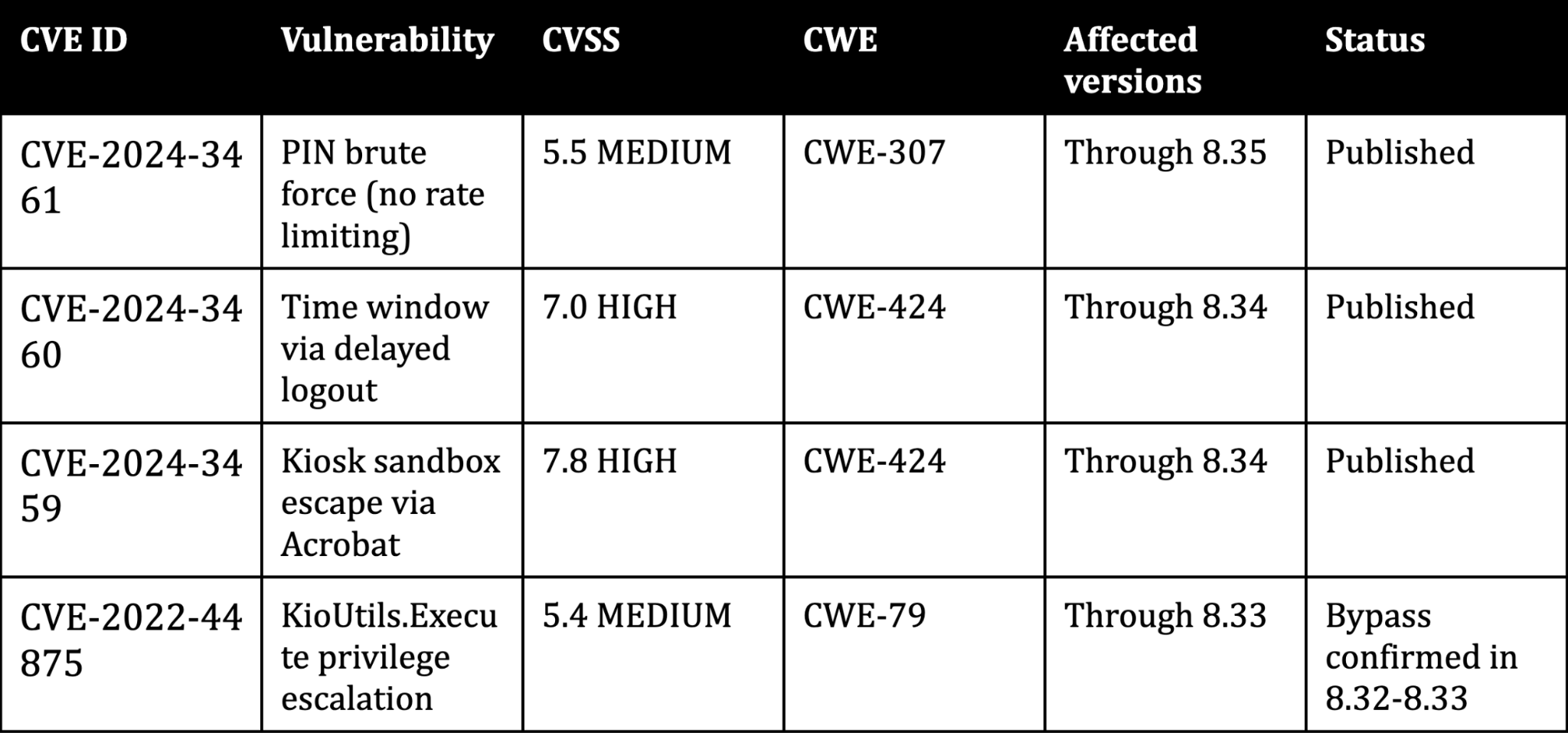
All three CVEs were coordinated through CERT Polska.
What comes next
A kiosk breakout works because kiosks are designed to keep casual users out, not to resist a deliberate attacker. Each security control looks reasonable in isolation. It is the interactions between controls - file type associations, iframe trust boundaries, application startup sequences - where the gaps appear.
In Part 3, I will look at why this matters beyond the lab. Kiosks sit on corporate networks, handle payment data, and process personal information. When a kiosk breakout leads to SYSTEM access, the blast radius extends far beyond a single terminal.
Frequently asked questions
How do you escape kiosk mode on Windows?
A kiosk breakout on Windows typically exploits gaps between the kiosk lockdown software and the underlying operating system. Common methods include file dialog escapes (using File > Open dialogs to browse the filesystem) and exploiting file type associations that hand control to external applications. Other approaches target keyboard shortcuts the kiosk failed to block or trust boundary issues in the kiosk's JavaScript API. The specific technique depends on which kiosk lockdown software is in use and how it is configured.
What is a kiosk breakout attack?
A kiosk breakout attack is any method used to escape a kiosk's locked-down environment and access the underlying operating system or network. Unlike a simple bypass (skipping a login screen), a kiosk breakout attack typically involves chaining multiple techniques - getting past authentication, escaping the application sandbox, and escalating privileges. In my KioWare research, the full kiosk attack chain required four separate vulnerabilities to move from physical access to NT AUTHORITY\SYSTEM.
What vulnerabilities exist in kiosk lockdown software?
Kiosk lockdown software vulnerabilities fall into several categories. Authentication weaknesses include missing rate limiting on PIN entry. Sandbox escapes exploit file type associations or browser plugins that break out of the kiosk environment. Privilege escalation flaws expose JavaScript APIs that run with SYSTEM-level access.
Incomplete patching means vendors claim a fix when the vulnerability remains exploitable. The KioWare vulnerabilities in this post - CVE-2024-3459, CVE-2024-3460, and my bypass of CVE-2022-44875 - cover all four categories.
How do you test kiosk security?
Kiosk security testing methodology starts with the physical layer (USB ports, keyboard access, boot sequence) and works inward. Test the authentication mechanism for brute force resistance. Attempt to reach the operating system through file dialogs, print dialogs, help menus, and any feature that opens a window outside the kiosk application.
Test file type associations by downloading files that trigger external viewers. Check whether JavaScript APIs expose elevated functions. For a structured approach, AFINE's Desktop Application Security Verification Standard (DASVS) covers verification requirements for desktop applications, including kiosk environments.
What is the difference between kiosk mode and restricted desktop?
Kiosk mode locks the system to a single application running fullscreen, hiding the taskbar, Start menu, and all other programs. A restricted desktop limits what the user can do but still shows a desktop environment with selected applications available. In security terms, kiosk mode has a smaller attack surface because fewer applications are exposed. But as my research shows, even a single application with file download capability can provide a path to a full restricted environment breakout if file type associations are not controlled.
This is Part 2 of a three-part series on kiosk security. Part 1 covers cracking the KioWare PIN with a $3 microcontroller. Part 3 covers the business impact and defensive recommendations.
AFINE specializes in penetration testing of desktop applications, thick clients, and non-standard environments. Read our thick client penetration testing guide or talk to our research team about testing your kiosk deployments.
Sign-up to our Newsletter.