
A single HTTP GET returned a ten-character service password. The account I sent it from could do exactly one thing in the web UI: log in and look at its own profile. Nothing else. No devices page, no policies, no tasks. The moment that password landed in my Burp Repeater, the engagement changed shape into a textbook broken access control case study.
The target was Proget, a Mobile Device Management suite used across Polish public sector and enterprise deployments. I was testing a live deployment at a large infrastructure operator over roughly four weeks at the end of 2024. The suite has a web console for administrators and a paired Android app that runs on every managed phone. We had two accounts - a full admin (afine_mw) and a deliberately crippled local user (user32) with no permissions beyond viewing its own profile.
The brief said: see what the low-priv user can reach. What it reached was enough to compromise the MDM enrollment of any device in the fleet - by exploiting two broken access control bugs in the same API.
This post walks the broken access control chain exactly as it happened. Two findings got CVE numbers - CVE-2025-1415 (task enumeration) and CVE-2025-1416 (service password read) - but the story is in how they combine.
What is broken access control?
Broken access control (OWASP A01:2025) is a class of vulnerability where an application fails to enforce who is allowed to perform which action on which resource. It is the top entry in the OWASP Top 10 because it appears in most applications that are tested seriously, and because the impact is almost always direct data exposure or privilege escalation.
In API-first platforms like MDM consoles, broken access control typically manifests in one of three ways:
- A low-privileged user can reach API endpoints that expose data the UI would never render for them.
- An endpoint accepts an object ID in the URL path and never checks whether the caller owns that object - the classic broken object level authorization (BOLA), also called IDOR.
- Authorization is enforced in the frontend only, on the assumption that a legitimate user will not craft raw HTTP requests.
The two bugs in this post hit all three. The only gate on the vulnerable endpoints was "is this user logged in." That is not authorization - that is authentication with extra steps.
Why MDM platforms amplify broken access control impact
Mobile Device Management systems sit at an unusual trust boundary. From the server side, they hold fleet-wide data: every enrolled device, its user, its location, its installed apps, its backup diffs. From the device side, the MDM agent has near-root control: it pushes policies, installs apps, wipes data, reads system state, imits access to lower-level system features such as developer mode. Whoever controls the console controls the phones.
That combination means broken access control in an MDM console does not stay in the console. It leaks into physical devices. A low-privileged user who can read API responses they shouldn't is one step away from pushing policies, one step away from owning the endpoint. The blast radius of an authorization bug in this class of software is the whole device fleet.
The broken access control chain in one sentence
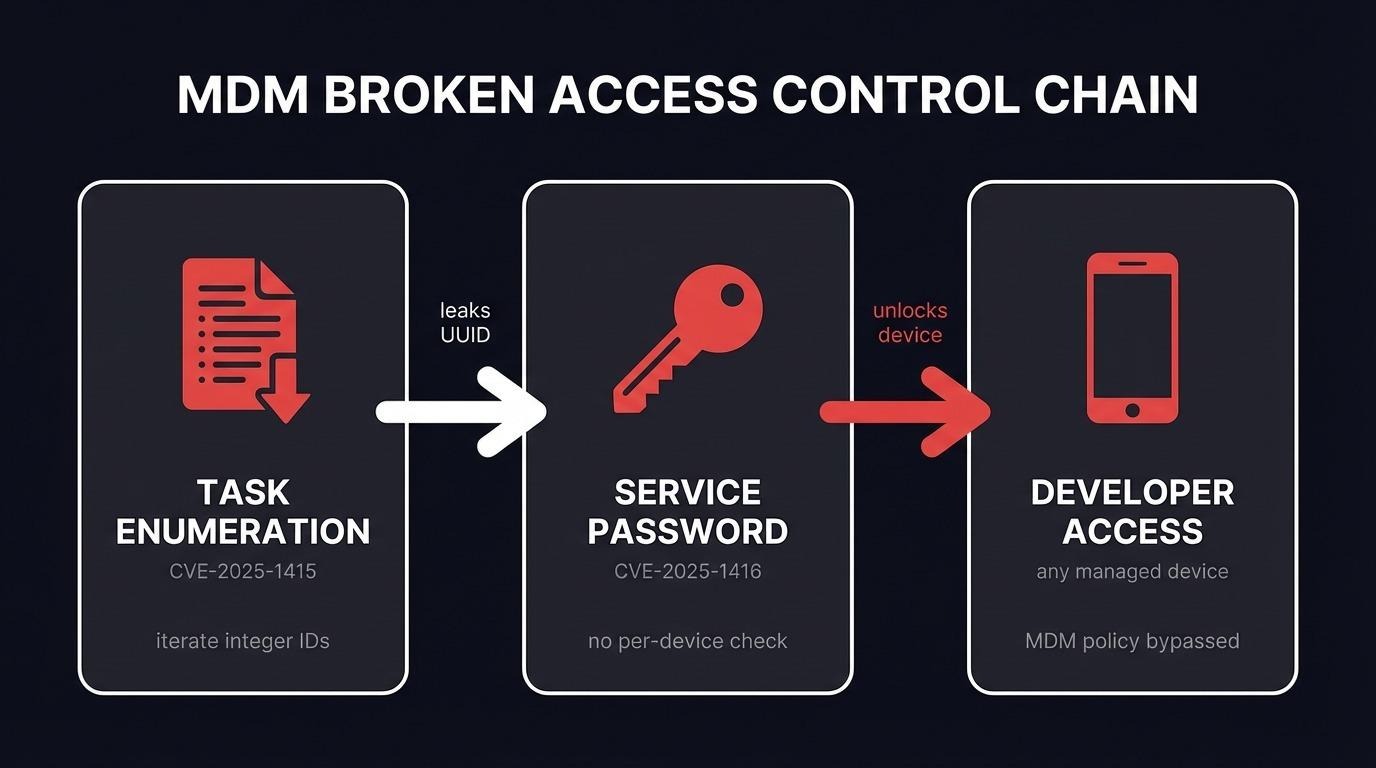
Enumerate task IDs as a numeric sequence (CVE-2025-1415), harvest device UUIDs from task responses, feed each UUID to the service password endpoint (CVE-2025-1416), enter the returned password into the Android app's hidden developer dialog - full developer access on any device in the fleet.
Each bug alone is medium severity. Chained, they break the MDM's core promise: that a regular user cannot reach another user's device.
Reconnaissance: what `user32` could reach
I logged in as user32. The web UI showed effectively nothing. No device list, no policies, no tasks. The only clickable element outside the profile page was logout.
That's the UI story. The browser was still issuing API calls in the background - standard behaviour for a React console - and Burp was catching every one of them. General assumption is that the API enforces authorization the same way the UI did: if the UI hides a button, the underlying endpoint must refuse the request too.
That assumption is wrong roughly forty percent of the time. It was wrong here.
Bug 1: Task enumeration via numeric IDs (CVE-2025-1415)
The first endpoint I poked at looked like a task history lookup:
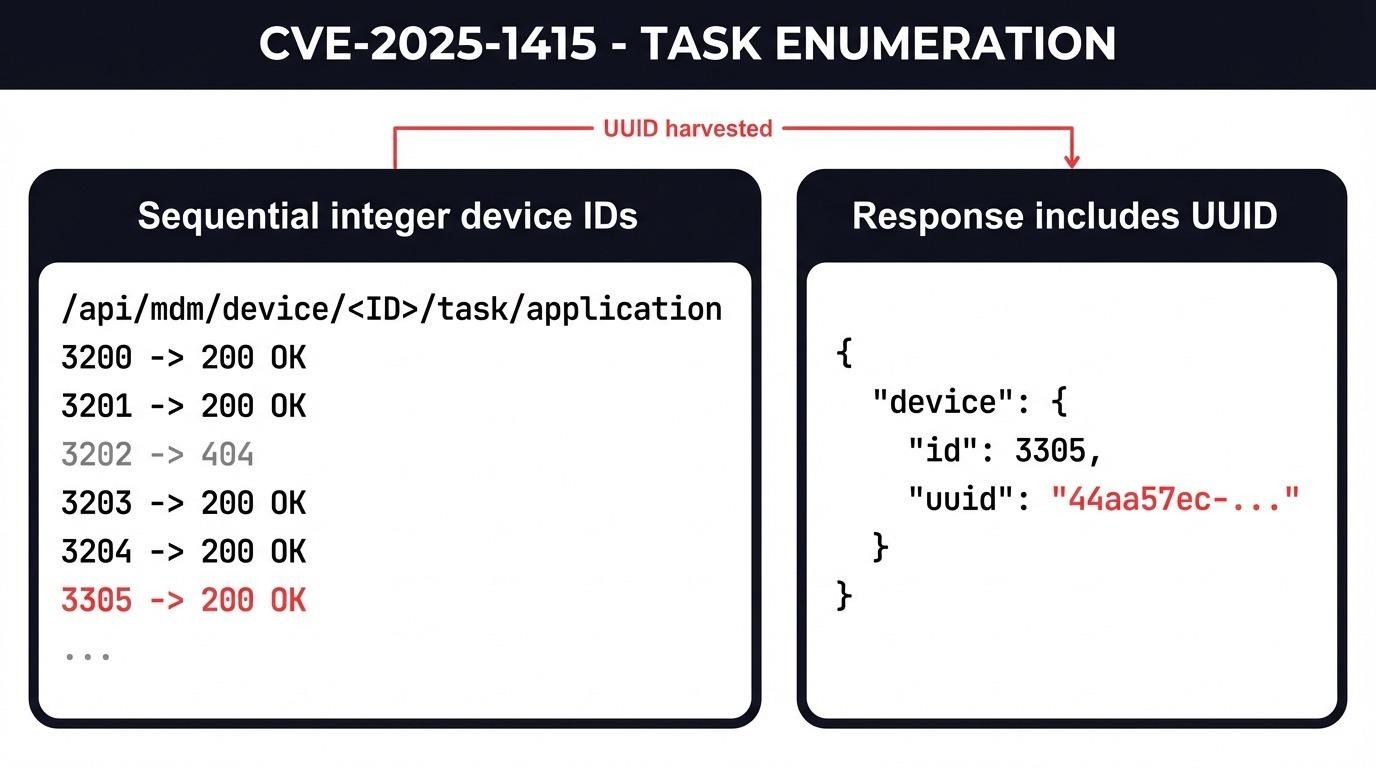
GET /api/mdm/device/{id}/task/application?limit=50&offset=0The {id} in the path was a small integer. Not a UUID. That single detail is the whole vulnerability.
The request I sent from user32:
GET /api/mdm/device/3305/task/application?limit=50&offset=0 HTTP/1.1
Host: mdm.example.internal
Authorization: Bearer <user32 JWT>
Accept: application/json, text/plain, */*
The decoded JWT confirmed the request was authenticated as a plain ROLE_USER:
{
  "roles": ["ROLE_USER"],
  "username": "user32",
  "legacyId": 4235
}
The server answered with HTTP 200 and a JSON blob containing the full task history for device 3305 - every backup, every policy push, every profile edit, who sent it, and, critically, the device's UUID:
{
  "items": [
    {
      "id": 43,
      "action": "backup.force",
      "senderUsername": "afine_mw",
      "device": {
        "id": 3305,
        "uuid": "44aa57ec-5b28-40c1-8c48-0adc8a93afed",
        "vendor": "VENDOR_REDACTED",
        "model": "MODEL_REDACTED"
      },
      "user": {"firstName": "managed", "lastName": "user"}
    }
  ]
}
Two things stood out. First, the integer device ID is trivial to enumerate. I pointed Burp Intruder at the range 3200-3400 as a proof-of-concept payload set. On a real engagement that range would be wider - fleets of 10,000+ devices are normal. Every response with HTTP 200 held a real device's task history.
Second, every response carried the device's UUID. That UUID is what I needed for the next step, and it's supposed to be unguessable. By design you can't brute-force a 128-bit identifier. But here I didn't need to - the task endpoint handed it to me on the way past.
This is the classic BOLA pattern: an authenticated endpoint that treats "the token is valid" as sufficient authorization. There is no check that the requesting user owns, manages, or has any relationship to the device ID in the path.
Bug 2: Service password read (CVE-2025-1416)
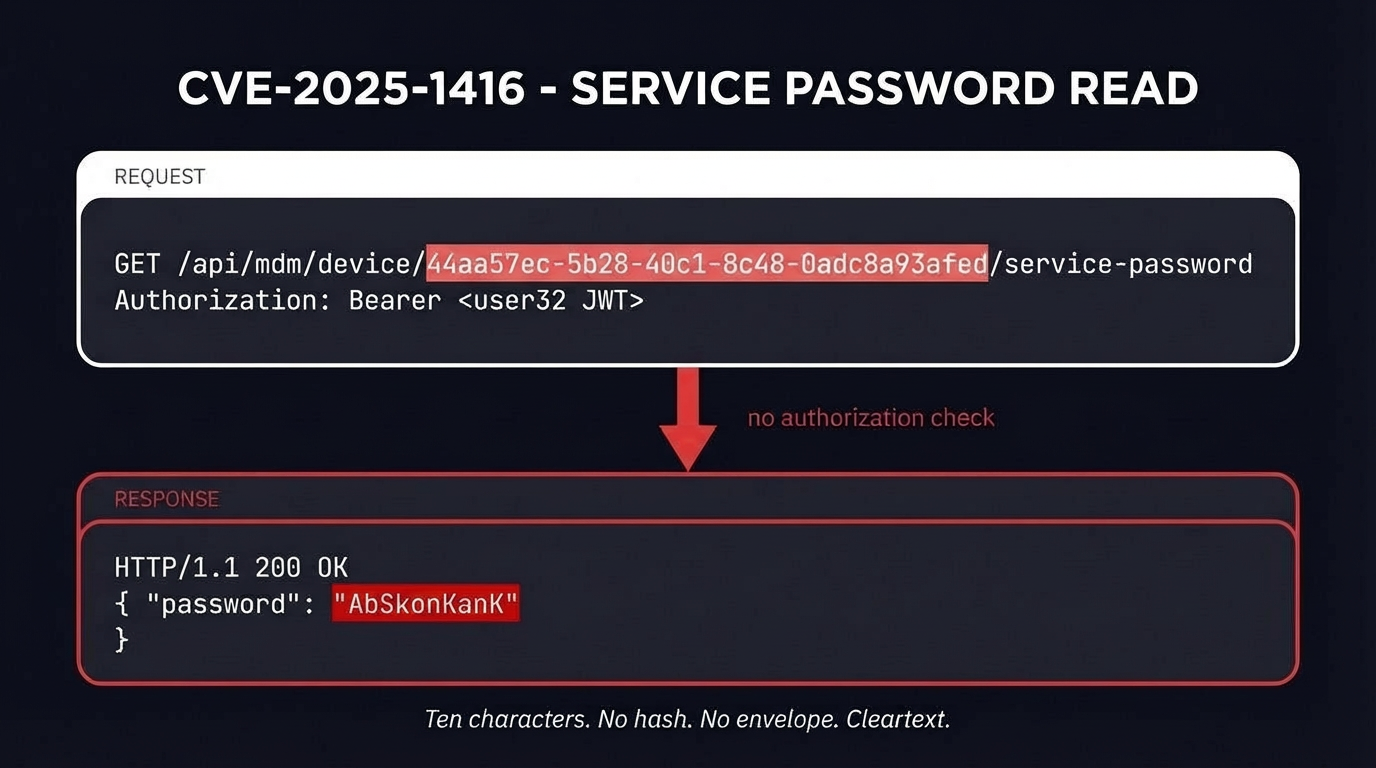
Now I had a UUID. The next endpoint in the chain was for retrieving device service passwords:
GET /api/mdm/device/{uuid}/service-passwordThe request, still authenticated as user32:
GET /api/mdm/device/44aa57ec-5b28-40c1-8c48-0adc8a93afed/service-password HTTP/1.1
Host: mdm.example.internal
Authorization: Bearer <user32 JWT>
The response:
HTTP/1.1 200 OK
Content-Length: 25
{"password":"AbSkonKanK"}
Ten characters. No hash, no envelope, no extra permission check. The password came back in cleartext as if I were the admin who provisioned the device.
Bug 3: Turning the password into device access
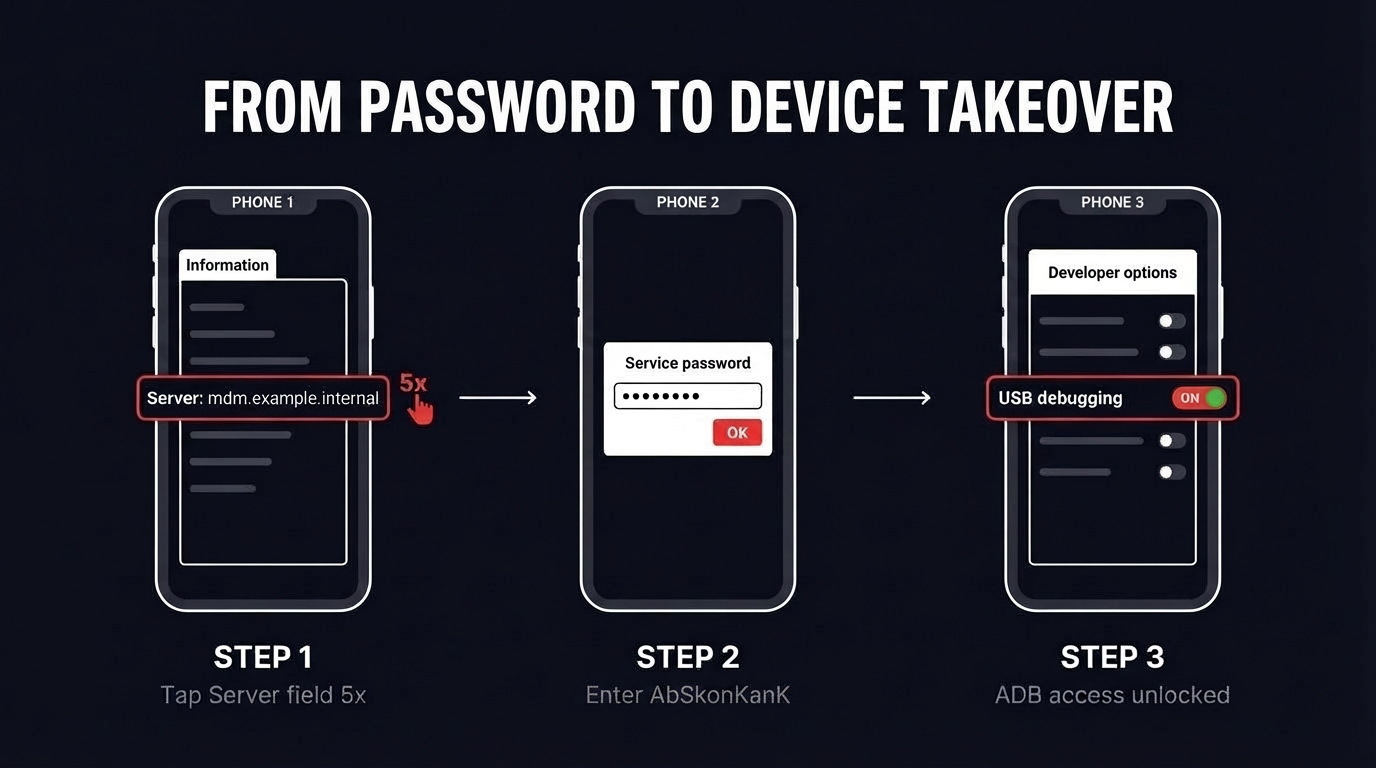
At this point I had a password string and no obvious way to use it. The password wasn't tied to the web console - my user32 login was already valid there. The password's purpose was something else.
I grabbed a managed test phone, opened the Proget Android app, and went hunting.
The standard Android path to developer options is seven taps on the Build Number field. On the test phone that path was blocked - tapping Build Number displayed a message that the option had been disabled by the device administrator. That's expected behaviour on managed devices. The MDM pushes a policy that kills the standard developer mode trigger.
What the policy did not block was the MDM app's own hidden trigger. In the Proget app, the "Information" tab contains a field labeled "Server." Tapping the Server field five times in quick succession opens a password dialog.
I typed AbSkonKanK.
The dialog accepted it and opened developer options for the device. From there, USB debugging, ADB access, and everything that flows from ADB on an Android device with Device Owner privileges. The MDM is supposed to be the last line of defense preventing exactly this state.
The important detail: the service password dialog is the MDM vendor's mechanism for letting their own support staff unlock a device for troubleshooting. It's not an accidental backdoor, it's a documented feature. The assumption was that only authorised console operators could retrieve the password. Bug 2 broke that assumption. Bug 1 broke it at scale.
Vulnerabilities in the broken access control chain

Both CVEs were fixed in Konsola Proget 2.17.5 following coordinated disclosure through CERT Polska. Five related findings from the same engagement received CVE-2025-1417 through CVE-2025-1421, covering backup diff access, profile listing, two stored XSS bugs, and a CSV injection path that lands Excel formulas in exported reports.
The other finding worth knowing about: CSV injection in exported reports
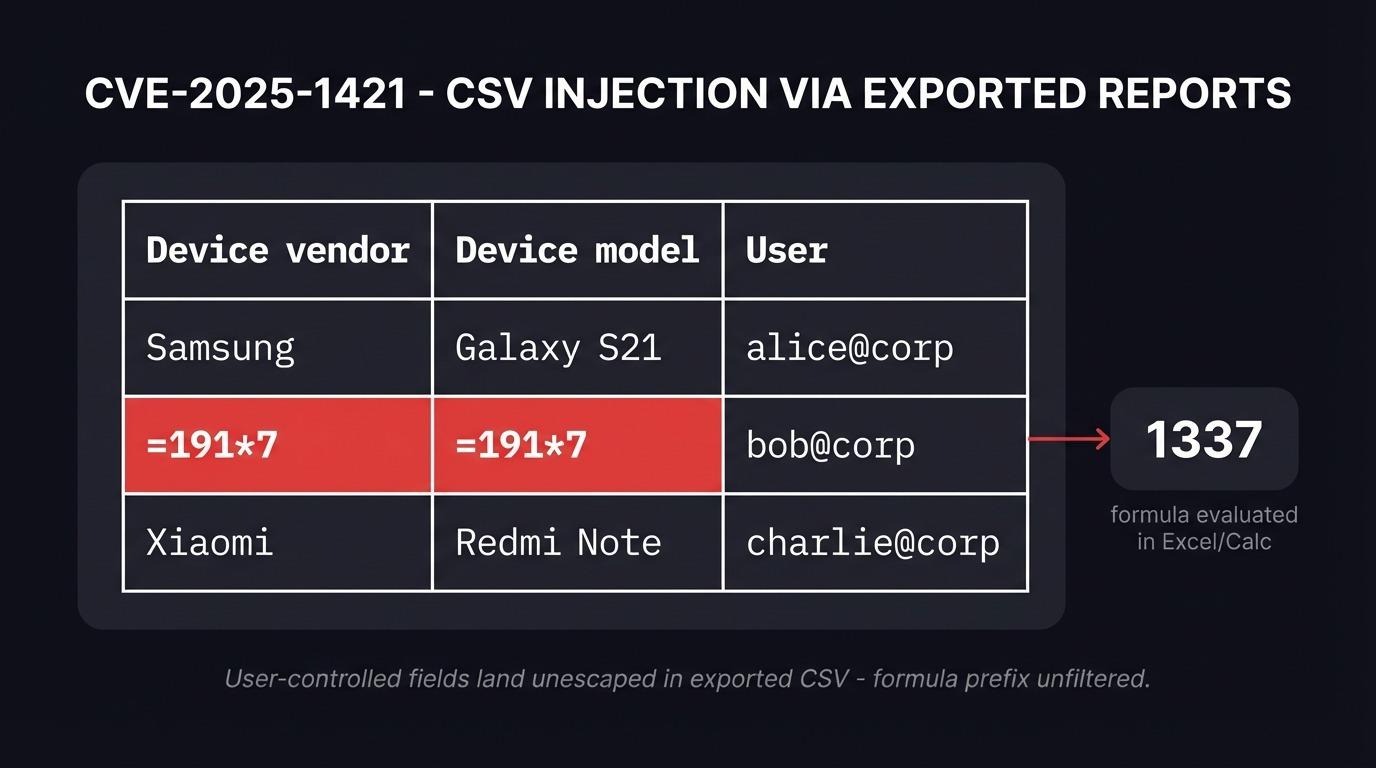
While poking at device activation, I noticed the vendor and model fields from newly-enrolled devices end up in CSV reports exported by administrators. The activation flow uses a QR code scanned on the phone, and the phone sends the vendor/model strings to the server during registration. If you proxy that traffic and swap the values, you can put arbitrary text into those fields.
The text lands unfiltered in the exported CSV. When an administrator downloads the file and opens it in Excel or LibreOffice Calc, anything starting with =, +, -, or @ is treated as a formula.
A row in an exported report with =191*7 in the vendor field:
"Device vendor","Device model",IMEI,"Serial number",User,"Operating system",Activation
=191*7,=191*7,,unknown,"Marcin Węgłowski",,android_for_work_device_owner
Opening that file in LibreOffice Calc calculated 1337 in place of the vendor name. Real CSV injection payloads go further - the classic =HYPERLINK("cmd|' /C calc'!A0","x") chain on Windows with DDE can reach shell execution, and more recent techniques pivot through WEBSERVICE() to exfiltrate data without requiring user interaction beyond opening the file.
This is CVE-2025-1421. It's the side channel where an attacker who compromises the enrollment flow gets code execution on administrator workstations without ever touching the MDM console directly.
Why broken access control keeps shipping
Every finding in this report boils down to one mistake: authorization decisions were made at the UI layer and not repeated at the API layer. The React console hides buttons from low-privileged users. The Spring backend serving the API trusts "valid JWT" as sufficient proof. Any request that arrives with a valid token gets answered.
This is why broken access control stays at the top of the OWASP Top 10. The pattern is specific enough to catch in code review but common enough that it ships in production software from vendors who should know better. The root cause isn't ignorance - it's an architecture choice where the same controller serves both admin and user roles and the developer forgot to add role checks to half the methods.
Three things would have caught all of this in-house:
- Authorization tests per endpoint, not per UI flow. Every API route should be tested with the lowest-privilege token that exists in the system. If the response is not HTTP 403, something is wrong.
- A role-based authorization matrix that lives next to the API definition. Every route declares which roles can reach it. Every new route has to claim a row in the matrix before it merges.
- UUIDs treated as identifiers, not as secrets. Design should never assume that knowing a UUID implies authorization. Authorization goes in the access control check, not in the opacity of the identifier.
Recommendations for defenders running MDM platforms
If you operate an MDM deployment - the following are worth checking immediately:
- Pull a list of every API endpoint your MDM server exposes. Hit each one with a token from the lowest-privilege role you can create. Response codes outside 403 on privileged actions are findings.
- Check whether your MDM has a service password, device unlock password, or support password concept. If it does, find the endpoint that returns it and confirm it's behind an authorization check that verifies the caller owns the device.
- Audit any exported CSV, XLSX, or PDF report your MDM generates from user-supplied input. CSV injection is trivially preventable by prefixing fields that start with =, +, -, @ with a single quote on export.
- If you're running Proget specifically, upgrade to Konsola Proget 2.17.5 or later, which fixes all seven CVEs from this engagement.
Frequently asked questions
What is broken access control?
Broken access control is a class of flaw where the server-side enforcement of "who can do what" is missing, incomplete, or applied inconsistently. The authenticated user is allowed to perform an action, or read a resource, they should not have access to. It is OWASP Top 10 A01:2025 - the single most common serious vulnerability class in web and API applications. In MDM systems it typically manifests as low-privileged users calling endpoints that return device-level data, policy data, or credentials the UI would never display to them. CVE-2025-1415 and CVE-2025-1416 are textbook examples.
What is a service password on a managed device?
A service password is a per-device credential that unlocks advanced features (developer options, diagnostic menus, device-level support actions) inside the MDM agent app. It exists so the MDM vendor's support staff can unlock troubleshooting features on a managed device without disabling the whole management policy. The threat model assumes only authorized console operators can retrieve it.
How does BOLA differ from classic IDOR?
They're the same concept under two names, and both sit inside the broader broken access control family. OWASP API Security uses "broken object level authorization" (BOLA) as the API-specific term. The pre-API web application literature uses "insecure direct object reference" (IDOR). Both describe an authenticated request that references an object ID in a path or parameter, where the server fails to check whether the caller is allowed to access that specific object.
Should pentest reports mention attack chains or individual bugs?
Both. Individual CVSS scores are driven by the per-bug impact, which is what CVE databases and NVD consume. But an engagement report should always spell out the chain if one exists - two medium bugs that produce a high-severity compromise are more valuable to the defender than two unrelated findings. Real operational risk lives in the chain.
How should teams test for broken access control in their own APIs?
Authenticate with a non-privileged account, enumerate every endpoint the UI exposes to privileged users, and replay each request with the low-privileged token. Compare responses. Any endpoint that returns data the low-privileged UI does not show is a broken access control candidate. Automate the replay with a Burp Suite or Caido extension and log any 200 OK response whose payload contains fields the caller's role does not own.