

This is Part 3 of a three-part series on kiosk security. Part 1: USB HID Attack for $3 covers brute-forcing the KioWare PIN with a $3 microcontroller. Part 2: Kiosk Breakout walks through three breakout techniques to NT AUTHORITY\SYSTEM.
A self-service kiosk in a bank lobby runs on the same network as the teller systems. It processes customer data. It handles transactions. It sits in a public space where anyone can walk up and interact with it. Most organizations never think to test it.
This is not unusual. Kiosk security - the protection of self-service terminals against unauthorized access, data theft, and system compromise - is a gap in most corporate security programs. Organizations test their web applications, their APIs, their cloud infrastructure. The kiosk in the lobby, the check-in terminal at the hotel, the payment machine in the parking garage - these get skipped.
The problem is not that kiosks are unimportant. It is that self service kiosk security risks are invisible to the people who write pentest scopes.
The $16 Billion Blind Spot
The self-service kiosk industry reached $16.01 billion in 2026. Every sector is deploying more of them:
- Banking: ATMs, self-service account terminals
- Transport: ticket machines, airport check-in, parcel lockers
- Retail and food: self-checkout, restaurant ordering kiosks
- Healthcare: patient registration, health monitoring terminals
- Hospitality: hotel check-in kiosks - 70% of American travelers now prefer self-check-in over the front desk (82% among Gen Z)
The kiosk hardening software market alone is worth $2.34 billion, projected to reach $6.05 billion by 2033 at a 10.8% CAGR. Organizations invest in a cyber security kiosk for USB scanning or deploy kiosk lockdown software - but rarely test whether those controls hold up against a motivated attacker.
The gap between deployment speed and security testing coverage is widening. More kiosks, more customer data, more payment processing - and the same pentest scope that excludes them.
What Happens When a Kiosk Is Compromised
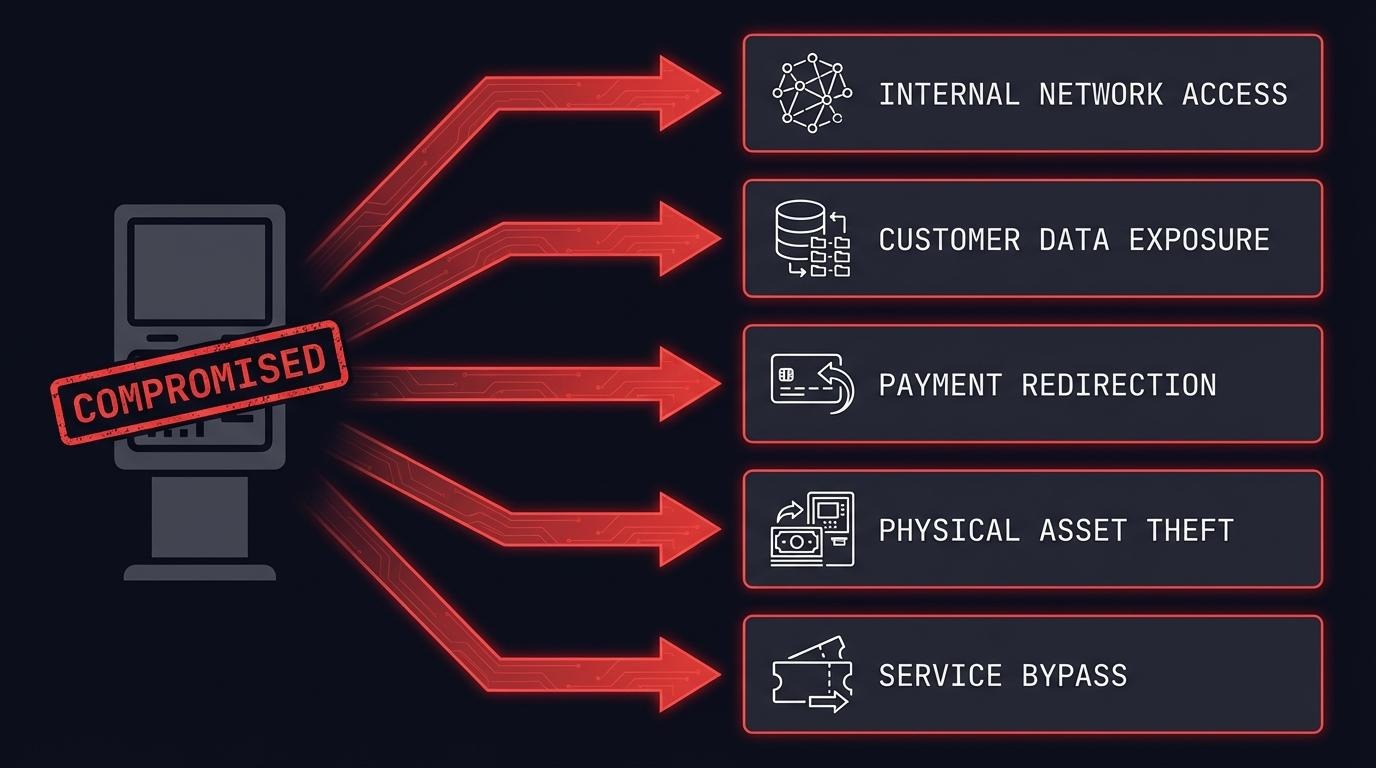
A compromised kiosk is not a standalone problem. It is a foothold. Five things an attacker can do from a kiosk that has been broken out of its locked-down environment:
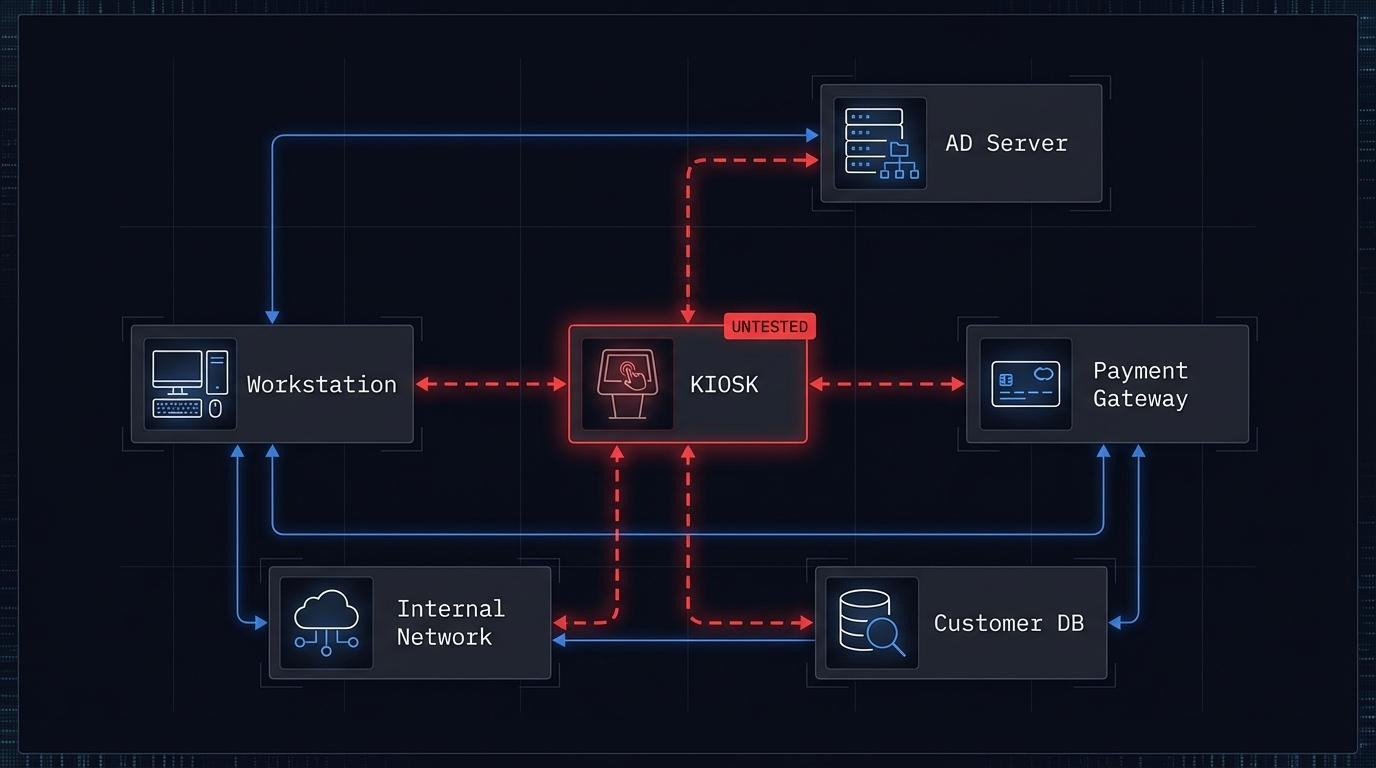
1. Enter the internal network. Kiosks connect to backend systems for transaction processing, inventory lookups, or identity verification. A compromised kiosk on an unsegmented network gives an attacker the same network access as any internal workstation. From there, lateral movement follows the same playbook as any internal penetration test.
2. Access customer data. Kiosks collect names, addresses, ID numbers, reservation details, health records. A hotel check-in kiosk stores guest information. A healthcare kiosk captures patient data. Once an attacker reaches the underlying operating system, that data is often accessible in local databases, config files, or cached sessions.
3. Redirect payments. Self-service payment kiosks handle credit card transactions, bill payments, and cash deposits. Modifying payment processing logic, intercepting transaction data, or redirecting funds is possible when the attacker has system-level access.
4. Steal physical assets. ATM cash withdrawal through offline exploit windows. Unauthorized parcel locker access. Manipulation of dispensing mechanisms. Kiosk compromise has a physical dimension that most IT security assessments ignore.
5. Bypass payment entirely. Print tickets without paying. Dispense products from vending machines. Access paid services for free. If the kiosk controls the transaction, controlling the kiosk means controlling the transaction.
These are not theoretical. Each one has been demonstrated in real-world incidents or in my own research.
Real Incidents, Real Impact
Hotel kiosk security risks - 3,000+ hotels exposed (CVE-2024-37364). Security researcher Martin Schobert of Pentagrid AG found that typing a single quote in the surname field of an Ariane Allegro check-in terminal crashed the application and exposed the Windows desktop. From there: access to reservations, invoices, personal data, and potentially RFID room key systems. Ariane Duo 6000 terminals are deployed in over 3,000 hotels worldwide. One character. Full system access.
ATM security vulnerabilities - $1.6 million stolen (Dan Saunders, 2011). An Australian bartender discovered that NAB ATMs processed transactions without server verification between 1 and 3 AM. Over five months, he withdrew $1.6 million by exploiting that window. No malware. No hacking tools. Just knowledge of when the security kiosk controls stopped working.
KioWare kiosk lockdown software - full escape chain (CVE-2024-3459, CVE-2024-3460, CVE-2024-3461). I found three vulnerabilities in KioWare for Windows, used by 15,000+ customers worldwide. The chain: brute-force the admin PIN (no lockout), exploit a timing window during logout, escape through a PDF viewer to reach the filesystem, and escalate to NT AUTHORITY\SYSTEM. When KioWare patched the original privilege escalation (CVE-2022-44875), I proved the patch was bypassable. The full technical walkthrough is in Part 1 and Part 2 of this series.
Three different products. Three different industries. Banking kiosk security vulnerabilities, hotel kiosk exploits, and kiosk lockdown bypasses - the same pattern: controls that fail under targeted testing.
PCI DSS Kiosk Requirements
Any kiosk that processes, stores, or transmits cardholder data falls under PCI DSS v4.0. This includes self-checkout terminals, payment kiosks, and any self-service device that accepts card payments.
The requirements are specific:
- Requirement 11.4 mandates penetration testing at least annually, and after any significant change to the cardholder data environment. A kiosk processing card payments is part of that environment.
- Requirement 6 covers secure development and maintenance of all system components - including the kiosk application and its underlying operating system.
- Requirement 9 requires physical security controls for any device that captures payment card data. Self-service kiosks in public spaces need tamper-detection mechanisms and regular inspection.
Self-service payment kiosks fall under the merchant environment and must meet the relevant SAQ (Self-Assessment Questionnaire) or full ROC (Report on Compliance). If your kiosks accept card payments and you have not included them in your PCI DSS scope, you have a compliance gap.
The presence of ads on "PCI DSS kiosk requirements" search results confirms this is an active concern for compliance teams. Organizations are searching for this guidance - and finding vendor content instead of actionable security testing frameworks.
Regulatory Exposure Beyond PCI DSS
PCI DSS is not the only framework that creates kiosk security compliance requirements.
DORA kiosk requirements (Regulation (EU) 2022/2554). Financial sector kiosks - ATMs, self-service banking terminals - are ICT assets subject to kiosk risk assessment under Article 6. Article 26 requires threat-led penetration testing (TLPT) for significant financial entities. Kiosks that process financial transactions cannot be excluded from that testing scope without a documented risk justification.
NIS2 (Directive (EU) 2022/2555). Transport sector kiosks (airport check-in, rail ticketing) and banking kiosks fall under essential or important entities. Article 21 requires cybersecurity risk-management measures including "security of network and information systems acquisition, development and maintenance" - which covers kiosk infrastructure and the software running on it. ENISA's technical implementation guidance provides the practical framework for meeting these requirements.
GDPR (Regulation (EU) 2016/679). Any kiosk collecting personal data in the EU must comply. Article 32 requires "appropriate technical and organisational measures" and specifically calls out "regularly testing, assessing and evaluating the effectiveness of technical and organisational measures for ensuring the security of the processing." A kiosk collecting customer names, IDs, or health information is a data processing system. If it has never been tested, that is a documented gap.
Healthcare kiosk security. Kiosks handling protected health information fall under additional regulatory requirements depending on jurisdiction. In the EU, GDPR applies. In the US, healthcare kiosks handling PHI would fall under HIPAA Security Rule safeguards.
The common thread: if a kiosk collects, processes, or transmits sensitive data, at least one regulatory framework requires you to test it.
What a Kiosk Penetration Test Covers
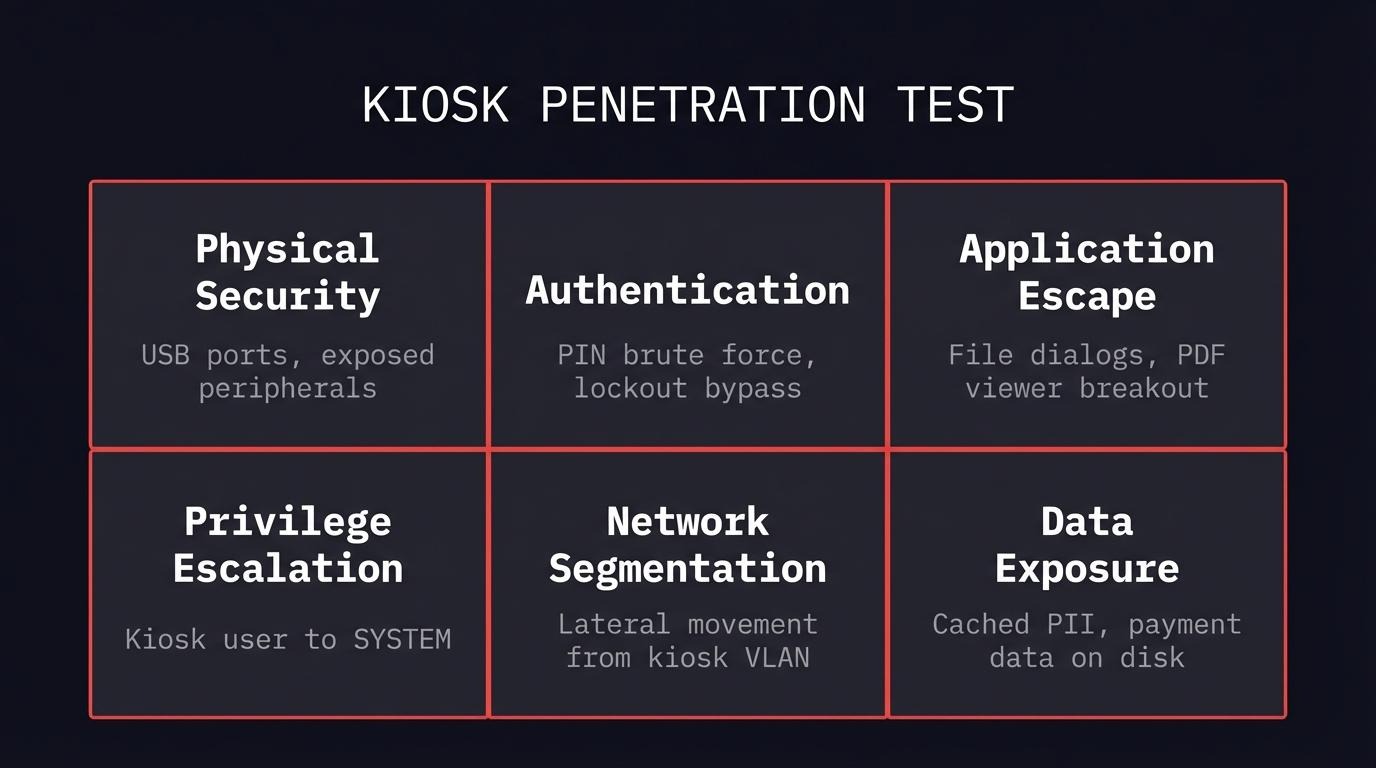
A kiosk security assessment is not a standard web application test. It combines physical penetration testing, application security, and network assessment in a way that mirrors how an attacker would approach the device - closer to the OWASP IoT Security Testing Guide than a web app assessment. Consider this section a kiosk hardening guide from the attacker's perspective.
Here is what a kiosk security checklist looks like in practice:
Physical security. Are USB ports accessible? Can an attacker plug in a $3 device and send automated keystrokes? Are peripheral ports (serial, ethernet, HDMI) exposed? Can the device casing be opened without specialized tools? My KioWare research started with a USB device that cost less than a cup of coffee.
Authentication testing. Does the admin PIN have a lockout mechanism? How many attempts before lockout? Is the PIN transmitted securely? Can default credentials access configuration interfaces? In the KioWare case, the admin PIN had no lockout - brute force was trivial.
Application escape testing. Can users reach file dialogs through print functions, help menus, or external application handoffs? Do PDF viewers, media players, or browser components break out of the kiosk sandbox? The most common kiosk breakout path is through a legitimate application feature that opens a file dialog or browser window.
Privilege escalation. What user context does the kiosk application run under? Can an attacker escalate from the kiosk user to local administrator or SYSTEM? Are there trust boundaries between the kiosk application and the underlying operating system? In my research, the chain ended at NT AUTHORITY\SYSTEM - full control.
Kiosk network segmentation. Can a compromised kiosk reach internal systems? Is the kiosk on its own VLAN? What services are accessible from the kiosk's network segment? Zero trust principles apply here - a kiosk on an unsegmented network is an internal workstation in a public lobby.
Data exposure. What customer data is stored locally on the kiosk? Are credentials cached? Can transaction history, personal information, or payment data be accessed from the filesystem or memory? The Ariane hotel kiosk exposed reservation databases and guest PII through a single-character input.
FAQ
What compliance standards require kiosk security testing?
PCI DSS v4.0 requires annual penetration testing for any environment processing cardholder data - including self-service payment kiosks. DORA requires threat-led penetration testing for significant financial entities, which includes ATMs and banking terminals. NIS2 requires cybersecurity risk-management measures for essential entities in transport and banking. GDPR Article 32 requires regular testing of security measures for any system processing personal data. If your security kiosk deployments touch any of these categories, testing is not optional.
How much does a kiosk penetration test cost?
Cost depends on scope: how many kiosk types, how many locations, whether physical testing is included, and how deep the network assessment goes. A single kiosk type in a lab environment is a different engagement than testing five kiosk models across three branches with network segmentation validation. Contact us for scoping.
What is a kiosk breakout attack?
A kiosk breakout is when an attacker escapes the restricted kiosk environment and reaches the underlying operating system. Common techniques include abusing file dialogs (print, save as, open), exploiting external application handoffs (PDF viewers, browsers), using USB HID devices to send keyboard shortcuts, and exploiting timing windows during application transitions. My three-part series demonstrates a complete breakout chain: Part 1 covers brute-forcing the PIN, Part 2 covers three breakout techniques to SYSTEM.
How do you prevent kiosk escape?
No single control prevents kiosk escape. Effective kiosk hardening requires layers: disable USB ports at the hardware or BIOS level, block all keyboard shortcuts at the OS level (see Microsoft's Assigned Access recommendations for Windows kiosks), remove unnecessary applications (especially PDF viewers and browsers that can open file dialogs), implement admin PIN lockout after failed attempts, run the kiosk application with minimal privileges, and segment the kiosk network so that a breakout does not become a network intrusion. Apply CIS Benchmarks for Windows to the underlying OS before any kiosk-specific lockdown. Most importantly, test these controls regularly - every security kiosk deployment should be validated by someone trying to break out of it.
What is the difference between kiosk mode and restricted desktop?
Kiosk mode runs a single application in fullscreen, replacing the desktop entirely. The user should never see the taskbar, start menu, or any other application. Restricted desktop allows multiple approved applications but limits what users can access. Both can be escaped if the lockdown software has vulnerabilities - kiosk mode through application handoff exploits, restricted desktop through privilege escalation or bypassing application whitelists. The KioWare vulnerabilities I found affected kiosk mode, which is supposed to be the more restrictive option.
Start With Your Kiosk Security
If you run self-service kiosks that process customer data, handle payments, or sit on your corporate network - and they are not in your pentest scope - you have a gap. Not a theoretical risk. A documented, demonstrable gap that your next auditor, regulator, or attacker will find.
I have published three CVEs in kiosk lockdown software and proved a vendor patch bypass. I know where these devices break. If you want to find out where yours break before someone else does, let's scope it.
Read the full series: Part 1: USB HID Attack for $3 | Part 2: Kiosk Breakout
For a broader look at testing desktop applications and thick clients, see our thick client penetration testing guide.