
On 3 May 2025, 01:19, we reported to Microsoft that they created zero day vulnerability in the macOS Hardened Runtime. They did not answer that until we asked for an update on 12 Aug 2025, 11:40. Roughly 5 hours later (12 Aug 2025, 16:58), we received an answer that they will not patch it as they do not see any security impact.

Well, let’s see if that is true.
Understanding macOS Hardened Runtime Protection
In short, it validates the signature of all loaded code in the process, which means the attacker cannot:
- Inject code at runtime.
- Modify libraries at rest.
We can add Hardened Runtime Capability in Xcode using +Capability:
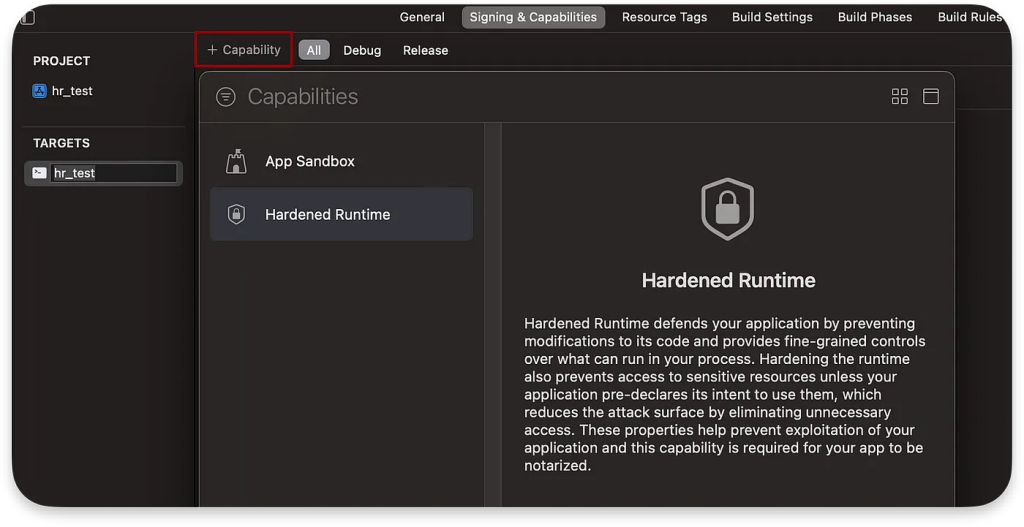
By selecting this option, the code signing flags will be set to runtime:

It was introduced in 2018 and makes it very hard to attack third-party apps that use this capability. If you are wondering why attack apps on macOS, read these two articles before proceeding:
In case you do not have time, in short, the attacker’s goal is to escalate TCC permissions (a security layer above the root), read sensitive memory information of the process app (such as passwords), and modify its behavior (e.g., to redirect a bank account transfer to a different account).
Runtime Protection
During runtime, we cannot acquire the task port of the app process, even as root, which means we cannot inject code into it:
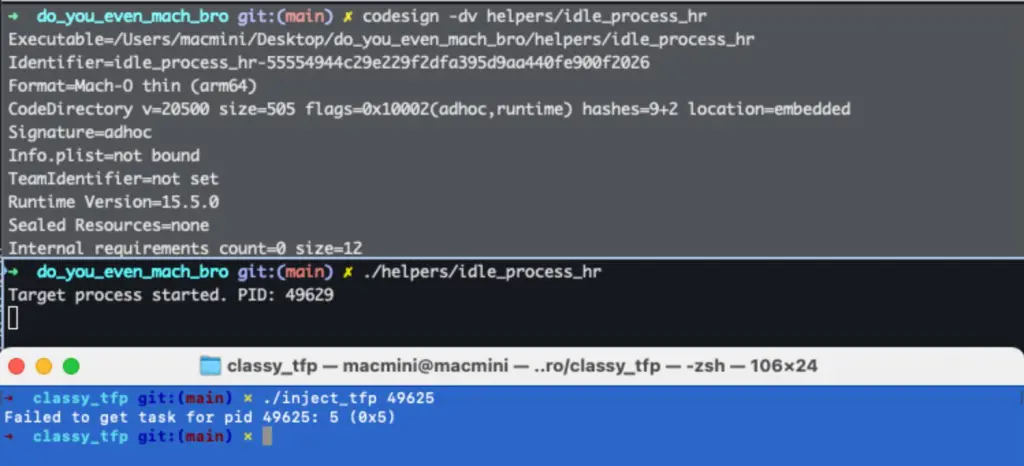
Unless there is some security bad practice, for instance, using debug entitlements as described in “To allow or not to get-task-allow, that is the question.” or we have a 0-day.
Dynamic Libraries Protection and Zero Day Bypass
We assume readers know what the Dynamic Library is. Otherwise, check the Snake&Apple IV — Dylibs article before continuing. In short, it is a pre-compiled code loaded into memory when a program starts running. When Hardened Runtime is enabled, the Code Signature of every Dynamic Library that is loaded is checked on launch.
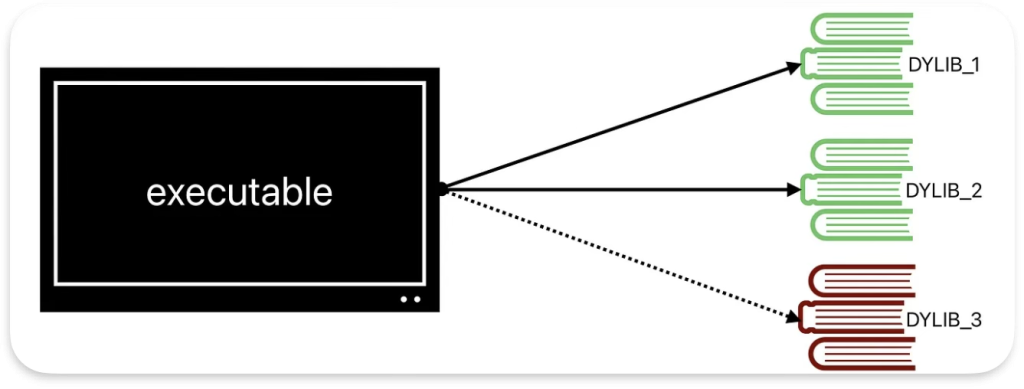
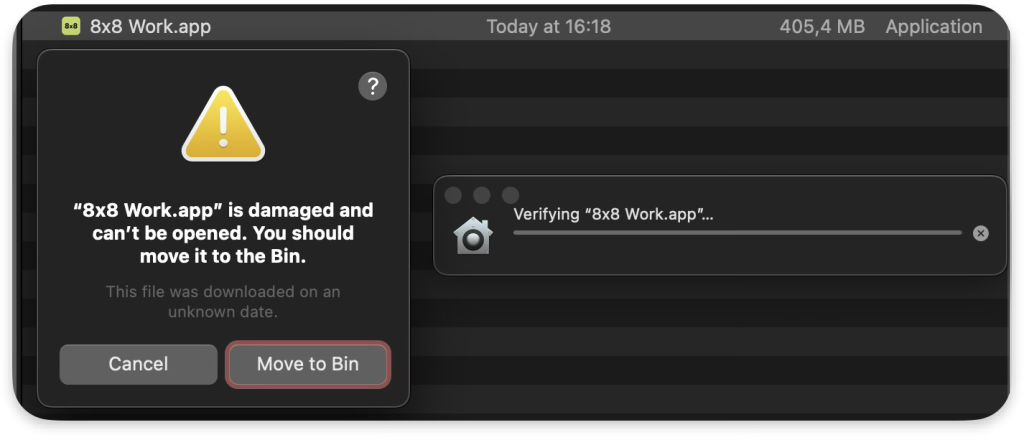
If any of these signatures is not known for the executable or the code of the dylib is modified, then macOS (AMFI) will stop the execution:
As Runtime Protection it also can be misoncfigured for instance by codesigning the app main executable with entitlement that disable dylib validation (com.apple.security.cs.disable-library-validation).
Why This Zero Day Vulnerability Matters
Even Apple, in their documentation, makes it crystal clear that library validation backed by Hardened Runtime is an essential security feature:
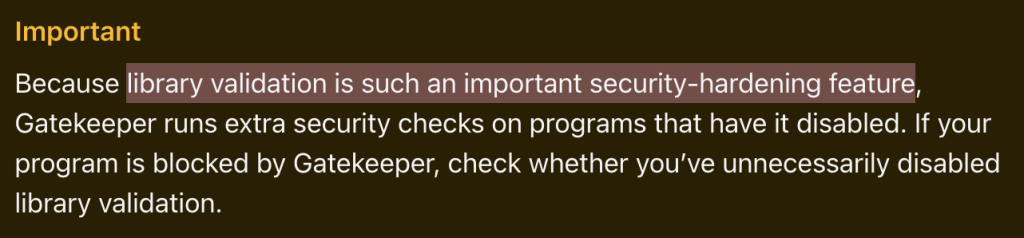
It is equally essential to Runtime Protection, since an attacker with a library validation bypass can just:
- modify the app dylib,
- kill the app process,
- re-launch the app.
Furthermore, if the app comes with a bundled XPC helper (which runs as root), such a bypass gives the attacker root privilege escalation. However, in most cases, it allows for TCC bypass and sensitive info leak.
Generally, these days, Hardened Runtime is a VERY important security checkbox on macOS, and any 0-day that allows bypassing it is considered critical in terms of local operating system security.
The Zero Day Vulnerability: Technical Analysis
Having addressed Microsoft’s lack of knowledge and misjudgment regarding the Library Validation bypass, let’s now examine the vulnerability that enables it. The .NET MAUI apps on macOS are vulnerable to code injection through DLL modification, even when signed with the Hardened Runtime flag. These apps do not enforce library validation for managed assemblies in the MonoBundle directory. This behavior effectively bypasses the Hardened Runtime protection mechanism without requiring the explicit com.apple.security.cs.disable-library-validation entitlement.
It is not an issue with a single app. EVERY app built in .NET MAUI is vulnerable!
How This Zero Day Vulnerability Works
The .NET MAUI apps on macOS utilize the Mac Catalyst framework to run cross-platform applications:
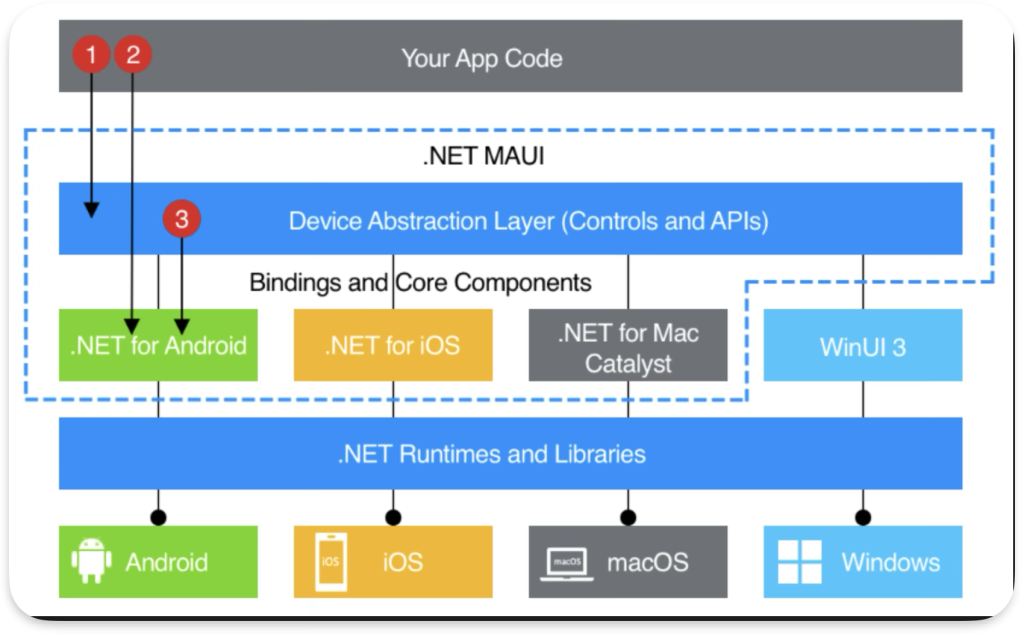
Here is a high-level overview of what happens with DLLs that we can find in the MonoBundle:

-
- main
- xamarin_main
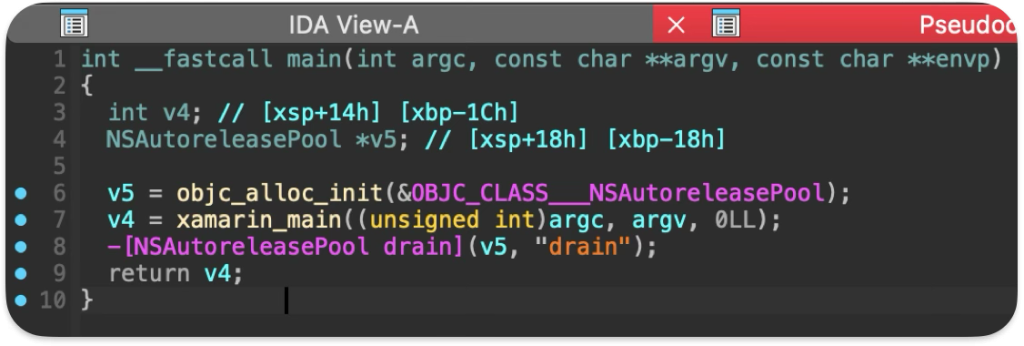
xamarin_vm_initialize– run mono
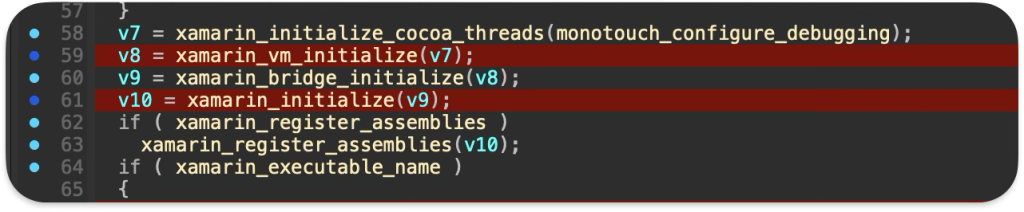
xamarin_open_and_register– load exe / dll
mono_jit_exec– run Main in loaded assembly

While the app executable has Hardened Runtime enabled and properly enforces code signing for native libraries, the managed DLLs within the MonoBundle directory are not subject to the same validation checks. It allows an attacker to modify any DLL within the app bundle, thus injecting arbitrary code that will be executed when the application runs.
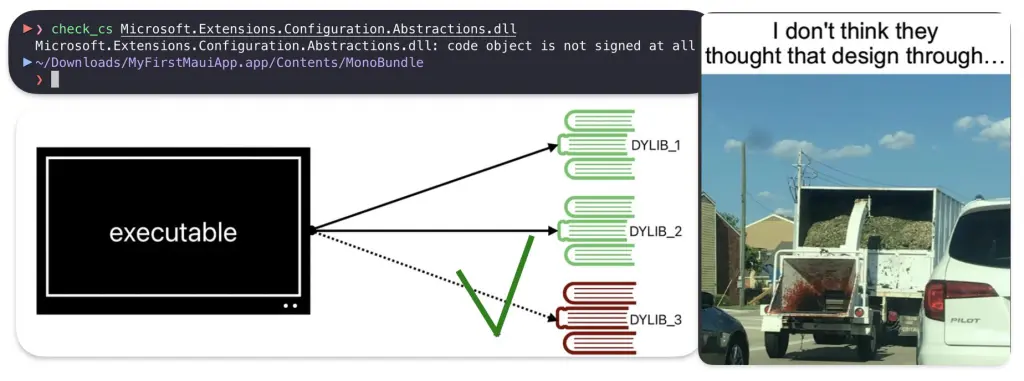
The DLL’s code signature is unchecked. In fact, these DLL files are not even code-signed.
PoC || GTFO
To demonstrate this vulnerability, perform the following steps:
- Create a simple .NET MAUI application (
MyFirstMauiApp.zip) using the official guide - Code-sign the application with the Hardened Runtime flag enabled
codesign --force --deep --options runtime --entitlements entitlements.plist --sign "FE7FF930DB0BC9F782DCA0FAC56BDD69A52C0B1A" MyFirstMauiApp.app- Verify the code signing and Hardened Runtime status, as shown by the presence of the runtime flag
flags=0x10000(runtime):
codesign -dvvv --entitlements :- MyFirstMauiApp.appExecutable=/Users/karmaz/MAUI/test/MyFirstMauiApp.app/Contents/MacOS/MyFirstMauiAppIdentifier=com.companyname.myfirstmauiappFormat=app bundle with Mach-O thin (arm64)CodeDirectory v=20500 size=71146 flags=0x10000(runtime) hashes=2212+7 location=embeddedVersionPlatform=6VersionMin=983040VersionSDK=1180672Hash type=sha256 size=32CandidateCDHash sha256=2c7a1d241bc85b8c20ebbfc681530ae4611951d3CandidateCDHashFull sha256=2c7a1d241bc85b8c20ebbfc681530ae4611951d379761ee7508c00db64d86a9bHash choices=sha256CMSDigest=2c7a1d241bc85b8c20ebbfc681530ae4611951d379761ee7508c00db64d86a9bCMSDigestType=2Executable Segment base=0Executable Segment limit=5455872Executable Segment flags=0x1Page size=4096CDHash=2c7a1d241bc85b8c20ebbfc681530ae4611951d3Signature size=4788Authority=Apple Development: kmazurek@afine.com (R5X636P694)Authority=Apple Worldwide Developer Relations Certification AuthorityAuthority=Apple Root CASigned Time=3 May 2025 at 00:13:17Info.plist entries=28TeamIdentifier=9AL8KYY8WMRuntime Version=18.4.0Sealed Resources version=2 rules=13 files=237Internal requirements count=1 size=200[Dict] [Key] com.apple.security.app-sandbox [Value] [Bool] true [Key] com.apple.security.network.client [Value] [Bool] trueCode language: JavaScript (javascript)Modify a library within the application bundle using a custom injection script./inject.sh MyFirstMauiApp.app/Contents/MonoBundle/Microsoft.Extensions.Logging.dll System.ThrowHelperSuccessfully run the application with the modified library, confirming code execution by observing HTTP requests to a controlled server127.0.0.1 - - [03/May/2025 00:02:14] code 404, message File not found127.0.0.1 - - [03/May/2025 00:02:14] "GET /poc HTTP/1.1" 404 -We modified Microsoft.Extensions.Logging.dll in the MonoBundle directory to inject code that makes an HTTP request, but it can be any DLL and any code you want. The script:
- Creates a static constructor in the
System.ThrowHelperclass - Adds code to make an HTTP request to a server under my control
- Successfully injects the payload as confirmed by both the script output and server logs
- Server logs confirmed that when the application was launched, the malicious code executed successfully
Below is also a Proof of Concept video that shows the injection.
In this GitHub repository you can find the example app and injector.
Mitigation
Until Microsoft resolves the issue, it is advised not to use apps built in .NET MAUI and not to build apps using it. Currently, it is not compatible with Hardened Runtime. You can quickly find these apps by filtering the MonoBundle directory:
find / -name MonoBundle
The ad-hoc solution for devs would be writing custom integrity checks for each DLL in the app’s main that would imitate the Hardened Runtime, but it is not advisable and can produce more bugs.
We did not check the iOS apps, but we can assume they are also vulnerable.
Microsoft’s Response to the Zero Day Vulnerability
This zero day vulnerability highlights the the challenges of implementing cross-platform solutions like .NET MAUI, which fails to integrate with Apple’s native protection mechanisms properly. We do not blame the creators of this solution, as they have a tough job, but we do blame the Microsoft Security Response Center triage team. Their bug bounty program gets worse each month. We see this as a real problem for security, as not only are real and impactful vulnerabilities not being patched, but also more and more researchers are stopping looking into their products.
There is one more thing. Microsoft is simultaneously conducting security research on macOS to identify new vulnerabilities, such as Sandbox or TCC bypasses. They do a great job in this area. Yet, they refuse to address the huge hole they created that has existed since 2019, which allows for much more than that. This is twisted logic. We hope this message reaches the MSRC management team and that you take action on it.
Apple is also aware of the problem, but they determined that this issue is specific to their third-party software and recommend reporting this directly to Microsoft. So we would not count on them patching this either.
References
- https://developer.apple.com/documentation/xcode/configuring-the-hardened-runtime
- https://devblogs.microsoft.com/xamarin/macos-hardened-runtime-notary
- https://developer.apple.com/documentation/security/hardened-runtime
- https://dotnet.microsoft.com/en-us/learn/maui/first-app-tutorial/install
- https://github.com/Karmaz95/macOS_HR_bypass_net_maui
- https://github.com/Karmaz95/Snake_Apple