
On a pentest I hit a Content-Type header that behaved very differently in different situations. The server returned:
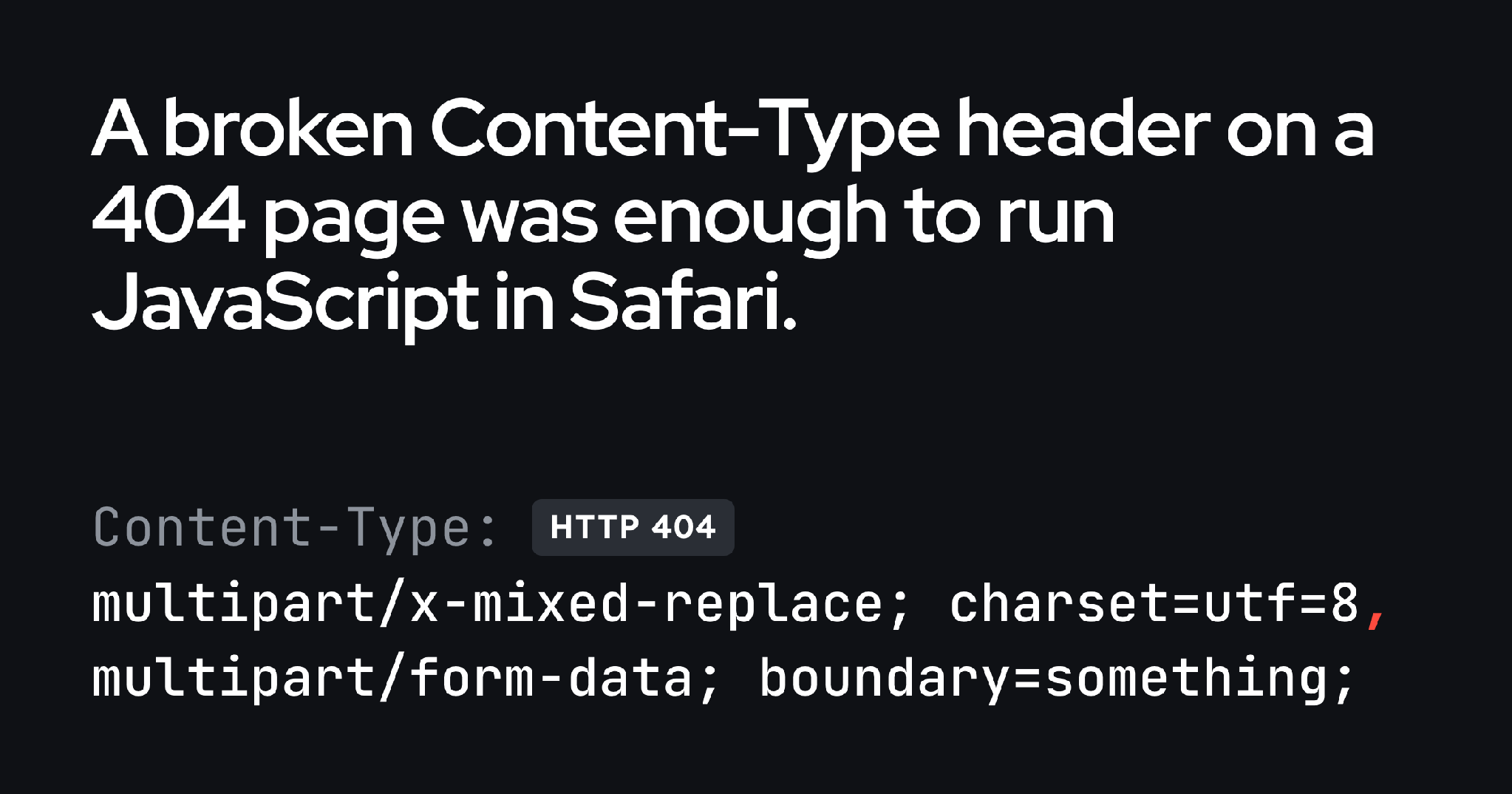
Content-Type: application/json; charset=utf=8,multipart/form-data; boundary=something;
In one case the browser tried to render the response as JSON. In another it tried to download a file. In places the response body reflected back what I sent it, which looked promising for XSS.
Building a list of MIME types that execute code
My first idea was to pin down every MIME type that, in a Content-Type header, lets the browser run JavaScript, or at least render HTML or CSS. I pulled candidates from Claude, from the IANA lists, and from single types scattered around the internet. That gave me a list of nearly three thousand MIME types.
Then I wrote a small Node.js app. It returns a short piece of HTML that starts with an svg tag and ends with an img tag that fires a request at a Collaborator server. The app opened that page in three browsers (Safari, Chrome and Firefox), and each time the site returned a different Content-Type. I drove the browsers with Playwright, which I figured should give reasonably reliable results.
These are the Playwright results, at status 200:
Safari: application/atom+xml, application/rss+xml, application/xhtml+xml, application/vnd.wap.xhtml+xml, application/xml, image/svg+xml, text/html, text/xml, text/xsl, multipart/x-mixed-replace.
Firefox: application/mathml+xml, text/html, application/vnd.wap.xhtml+xml, application/rdf+xml, application/xhtml+xml, application/xml, image/svg+xml, text/xml
Chrome: text/html, application/xhtml+xml, application/xml, image/svg+xml, text/xml, text/xsl
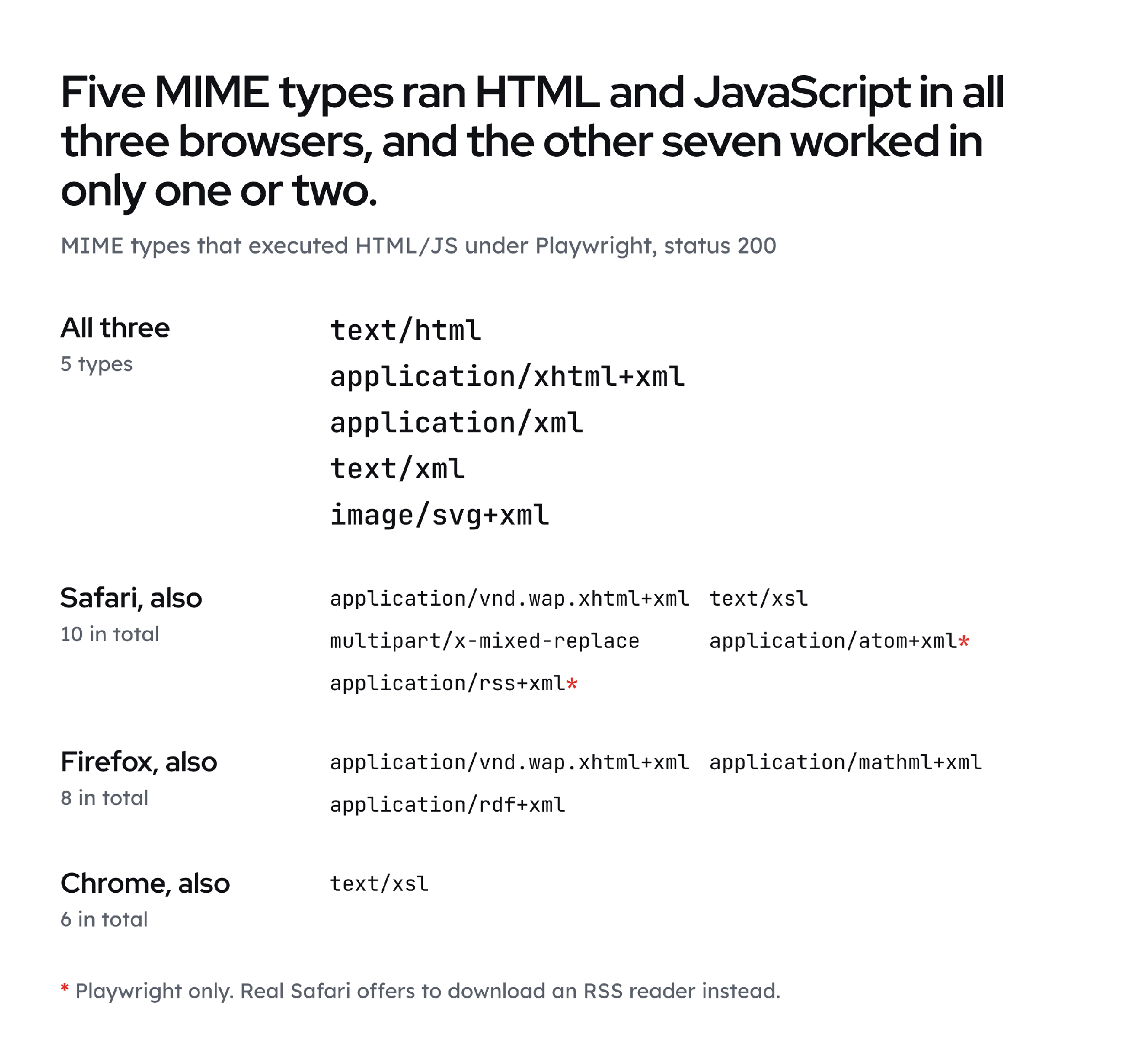
Two of the Safari entries did not hold up in real Safari. For application/atom+xml and application/rss+xml, real Safari does not run the page - it prompts you to download an RSS reader instead. The execution I saw for those two came from Playwright, not from Safari itself.
BlackFan's content-type-research repo already lists per-browser MIME types that execute, and siunam's "Parse and Parse" write-up (January 2026) covers the Firefox and Chrome comma behaviour I get to below.
Back to the odd header
Once I had a set of MIME types that execute, I went back to the odd header. I could influence the application/json part, so my goal was to inject a value that would get the browser to run code.
Firefox and Chrome always pick the MIME type after the comma, so code runs only if that type is one of the ones I found.
Safari behaves differently. It chooses dynamically, depending on need. For:
Content-Type: image/svg+xml; charset=utf=8,multipart/form-data; boundary=something;
Safari ran HTML at status 200. No other type from my list did that in this header. It still did not solve my problem, because for image/svg+xml the syntax has to be correct from the very first character, and I could only inject into part of the response, not all of it.
Then I noticed the status code mattered. Up to this point I had tested with status 200. Under 404, Firefox and Chrome, instead of returning a file, threw Invalid Response.
Safari, again, was the exception. Under 404 with the odd header, Safari ran scripts for multipart/x-mixed-replace too. A response of:
Content-Type: multipart/x-mixed-replace; charset=utf=8,multipart/form-data; boundary=something;
with status 404 made Safari interpret the HTML normally and run JavaScript.
On this application the Accept header I sent mapped straight onto the Content-Type that came back. Sending Accept: multipart/x-mixed-replace produced exactly that header.
That is the catch. I did not find a way to make a victim's browser send the Accept value I needed, for example through a link.
Content-Type separators
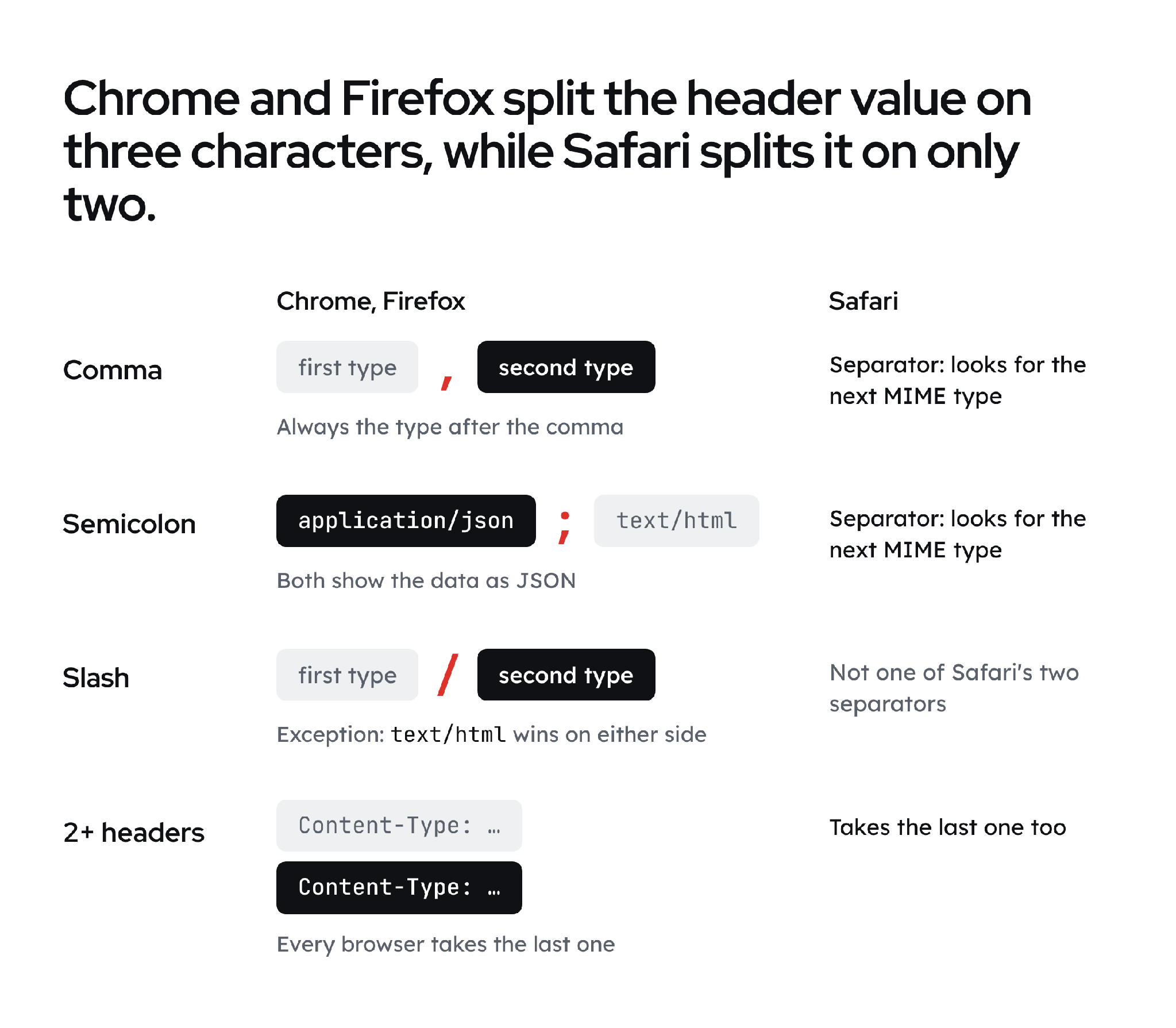
Safari supports two Content-Type separators, , and ;, and looks for the next MIME type after either. Firefox and Chrome have three: ,, ; and /.
- For
,, Firefox and Chrome always take the type after the comma (the second). - For
;, the first one wins.Content-Type: application/json; text/htmltells both browsers to show the data as JSON. - For
/, the second wins, same as the comma. - The exception is
text/html, which is selected whether it sits before or after the/.
With two or more Content-Type headers, every browser takes the last one.
BlackFan's XSS.md and siunam's write-up do not cover the / separator rule or the text/html exception. The comma rule is not new - BlackFan documents it and siunam covers it.
Which tags execute, and with what Origin
Next I tested which MIME types can run JavaScript when a resource is loaded through src, href and similar attributes (a[href], iframe[src], embed[src], object[data], script[src], input[formaction] and so on), and what Origin the resulting XSS would have. Some XSS through tags and src can return Origin null, which significantly limits what the vulnerability can reach.
The ticks mean:
- A blue tick means Origin equal to the site - high XSS potential.
- A green tick means code runs, but with Origin
null. - A grey cross means no tick (shown as
-in the compact table below).
Across the 13 MIME types in this table, every blue tick landed on the same row: script[src]. Safari was the only browser that did not execute script[src] for two of them - image/svg+xml and multipart/x-mixed-replace - where it shows a cross while Firefox and Chrome stay blue. The full breakdown, grouped by tag type, is in the table image.
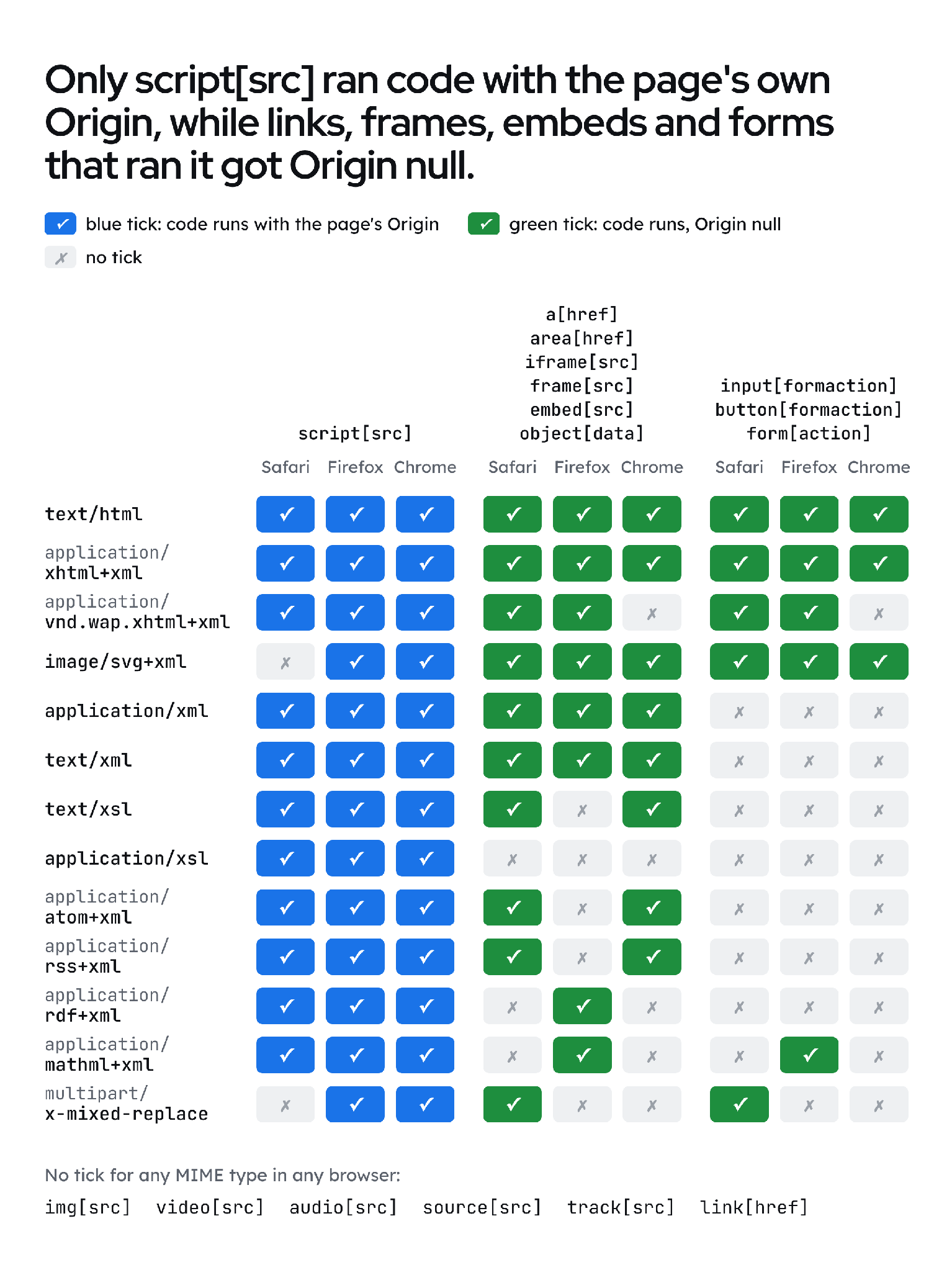
A compact version, showing where script[src] runs with Origin equal to the site:
MIME type                      Safari  Firefox  Chrome
text/html                      blue    blue     blue
application/xhtml+xml          blue    blue     blue
application/vnd.wap.xhtml+xml  blue    blue     blue
image/svg+xml                  -       blue     blue
application/xml                blue    blue     blue
text/xml                       blue    blue     blue
text/xsl                       blue    blue     blue
application/xsl                blue    blue     blue
application/atom+xml           blue    blue     blue
application/rss+xml            blue    blue     blue
application/rdf+xml            blue    blue     blue
application/mathml+xml         blue    blue     blue
multipart/x-mixed-replace      -       blue     blue
For multipart/x-mixed-replace, Firefox has a tick only on the script[src] row. BlackFan's XSS.md does not include this attribute-level and Origin breakdown.
Fingerprinting a stack from Content-Type and Accept
Content-Type and Accept handling alone can point to some stacks. I picked a few common ones - Spring, ASP.NET, Node.js, Django, Laravel, Ruby on Rails, Go and Rust - and skipped some same-language options that share the same HTTP handling.
Spring API endpoints return a 406 status for Accept values that do not map to JSON or XML. Of the stacks I tested, Spring was the only one that returned charset=UTF-8 in uppercase. It also lets you add parameters: application/json; test=123 comes back as Content-Type application/json; test=123. Depending on configuration not all of this shows, and in the worst case Spring is identifiable only by the uppercase UTF-8.
Node.js rejects certain control characters in the Accept header with a 400 Bad Request. These are the characters I saw rejected:
\x01 \x02 \x03 \x04 \x05 \x06 \x07 \x08 \x0e \x0f \x10 \x11 \x12 \x13 \x14 \x15 \x16 \x17 \x18 \x19 \x1a \x1b \x1c \x1d \x1e \x1f \x7f
A lot of this depends on configuration - Apache and Nginx settings change what you see - but in many cases these anomalies are enough to recognise some popular stacks.